Recent Articles

September 28, 2026

IKEA Matter Devices Work With SmartThings: What Users Can Connect and Automate

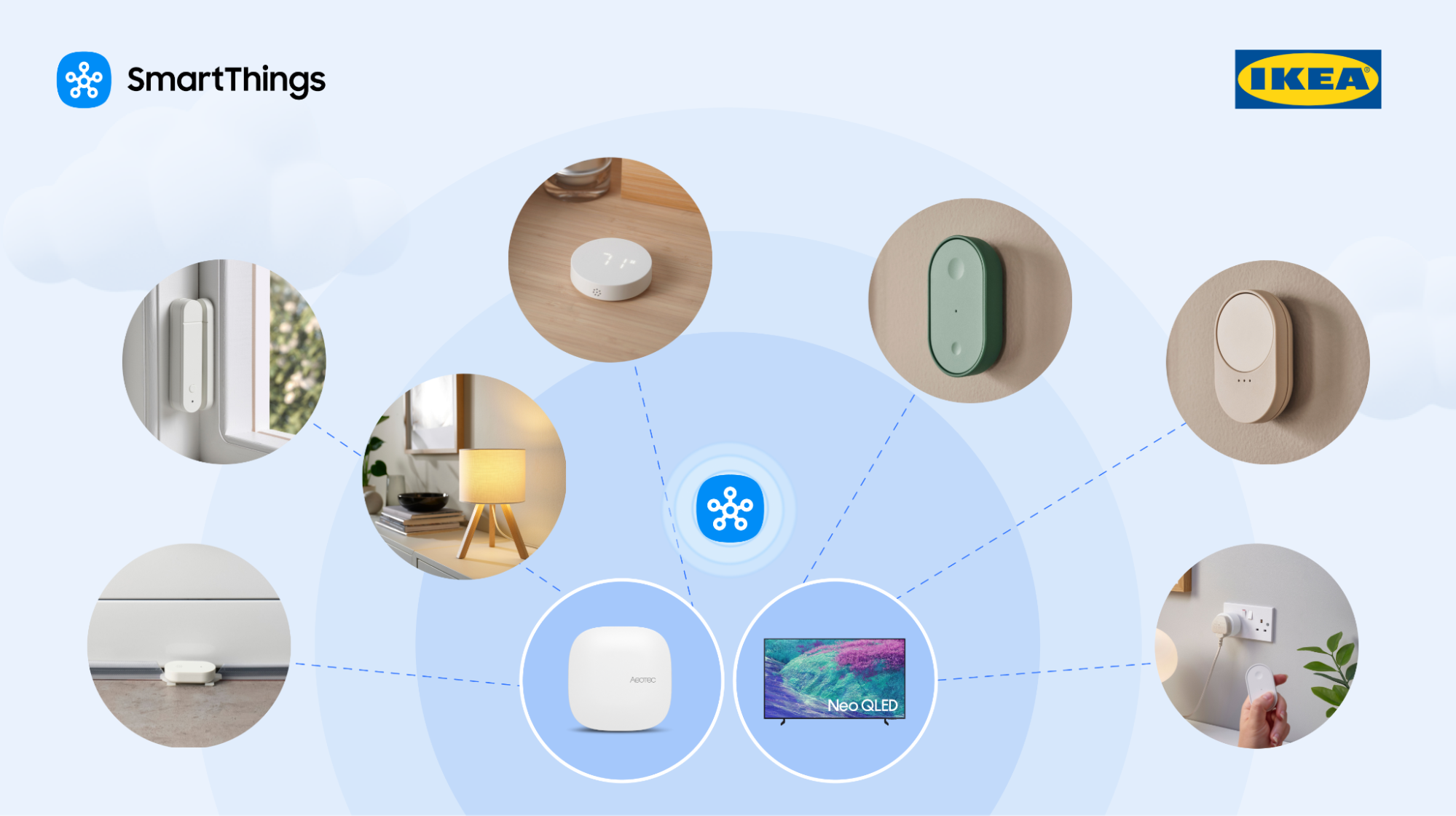
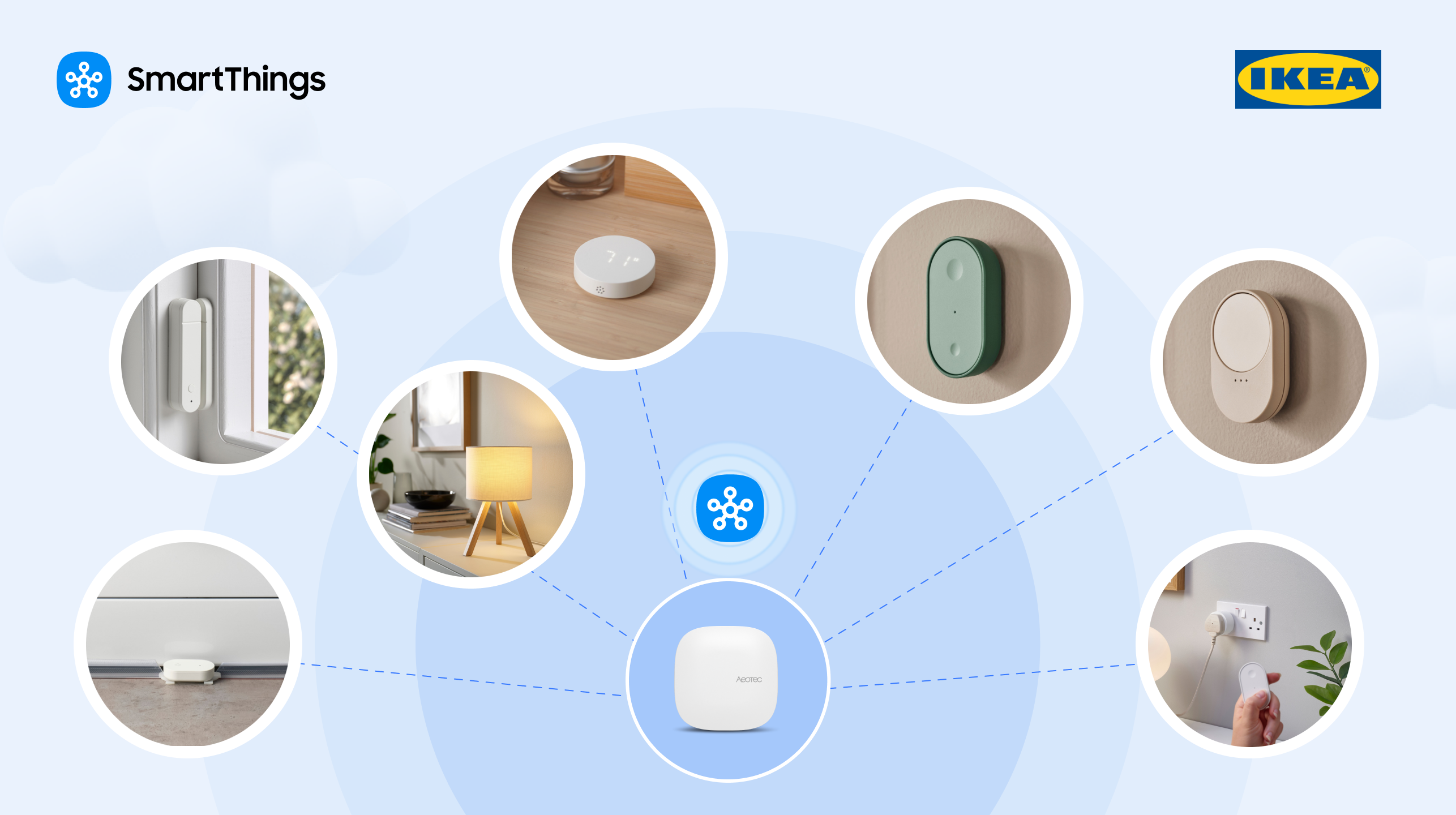
Did you know that Samsung SmartThings supports all IKEA Matter-over-Thread devices, including smart bulbs, plugs, remotes, and sensors that connect directly to a compatible SmartThings? Integrating these devices into an existing SmartThings ecosystem gives users a simple, cost-effective way to grow their smart home for family care, sleep optimization, environmental monitoring, leak detection and alerts, smart lighting control, and other practical automation solutions.  Can Users Add Affordable IKEA Matter Products to an Existing SmartThings System? Yes. IKEA's Matter-compatible products lets SmartThings users add affordable, compatible smart lights, smart plugs, sensors, and controls to enhance their current SmartThings setup as needed, rather than replacing compatible, previously purchased products. Do IKEA Matter Devices Require a DIRIGERA Hub with SmartThings? No. New IKEA Matter-over-Thread devices connect directly to a compatible SmartThings hub.. That means one less piece of hardware to buy, set up, and manage. Do IKEA Matter Products Work in a Mixed-Brand Smart Home? Yes. Supported IKEA Matter products integrate with compatible Samsung devices and other supported products using the SmartThings app. For example, users can connect an IKEA light, plug, control, or sensor and incorporate it into a SmartThings routine using a compatible Samsung appliance or device. Most homes run more than one brand. SmartThings lets users mix and match compatible products by category, lighting, sensors, appliances, plugs, and controls, and manage all of it from one app, instead of buying every device from a single brand. Do Door Sensors Work With SmartThings Family Care? Yes. A supported IKEA door sensor serves as an input, providing activity data alongside SmartThings Family Care. For example, a caregiver might place a sensor on a door a parent uses often, then use the resulting open-and-close activity, alongside Family Care, to get a sense of whether that parent’s day is off to a normal start. Can IKEA Air-Quality Sensors Support the SmartThings Sleep Environment Report? Yes. Compatible IKEA air-quality sensors provide data on bedroom conditions, i.e., temperature, humidity, and lighting levels, that SmartThings uses to generate the Sleep Environment Report. IKEA air-quality and temperature-and-humidity sensors measure parameters including temperature, humidity, CO₂ levels, and light intensity. SmartThings compares these readings against recommended sleep conditions and offers suggestions based on what it finds.   Do IKEA Sensors Trigger SmartThings Routines? Yes. Supported IKEA sensors provide conditions that trigger SmartThings routines involving doors, motion, moisture, temperature, humidity, and other environmental changes. For example, an IKEA humidity sensor detects rising humidity and activates dehumidifier mode on a compatible connected air-conditioning unit. A  water-leak sensor detects moisture and notifies the user of a possible water leak. Additionally, door and motion sensors generate activity signals for compatible monitoring and automation routines. The sensor spots the event; SmartThings handles the alert, notification, or next action.   Which IKEA Matter Devices Are Supported by SmartThings? IKEA Matter-compatible devices span multiple smart home product categories. Below is a breakdown of some examples: IKEA Product CategoryExampleHow to Use It With SmartThingsSmart bulbKAJPLATSLighting control and compatible routinesSmart LampVARMBLIXTLighting adjustment with color and temperatureSmart plugGRILLPLATS/TOFSMYGGAConnected-device control and compatible routinesSmart remote controlBILRESASupported lighting controlTemperature/humidity sensorTIMMERFLOTTEEnvironmental monitoring and humidity-based routinesAir-quality sensorALPSTUGAEnvironmental monitoring Open/closed sensor (door)MYGGBETTDoor activity and compatible monitoring routinesMoisture/water-leak sensorKLIPPBOKMoisture detection and alertsMotion sensorMYGGSPRAYMotion detection and compatible routines This range covers smart lighting, environmental monitoring, motion and activity detection, open/closed status, and connected-device control, so users can pick what fits their home. Does the IKEA BILRESA Scroll Wheel Remote Work With SmartThings? Yes. The IKEA BILRESA scroll wheel remote control supports lighting products through SmartThings. Rotating the wheel enables precise adjustments to brightness and color temperature. SmartThings and IKEA conducted multiple rounds of connectivity validation before market release to test pairing and operation through the SmartThings app. Currently, BILRESA supports lighting control and blind control (via Matter and Zigbee), with plans for expansion to more types of blinds and more device types in the future. What SmartThings Hardware Do Users Need for IKEA Matter-over-Thread Products? Supported IKEA Matter-over-Thread devices require access to a compatible SmartThings hub with Thread support. Select Samsung TVs, refrigerators, and monitors can serve as that hub. SmartThings hub and Thread border router functionality depend on the individual Samsung model, not just the product type. Users without one of these models can add a dedicated SmartThings hub, like the Aeotec Smart Home Hub 2. What Are Matter and Thread? Matter is an industry smart home connectivity standard developed by the Connectivity Standards Alliance to help compatible devices from different manufacturers work across supported ecosystems. Thread is a low-power wireless networking technology used by many Matter-compatible smart home devices. SmartThings supports Matter-over-Thread alongside other technologies such as Zigbee and Z-Wave, allowing compatible products using these technologies to operate through SmartThings. SmartThings was also the first to adopt Thread version 1.4, built  to increase interoperability between Thread networks from different manufacturers. SmartThings has supported Matter since the standard’s public launch and puts every certified device through rigorous, multi-round interoperability testing, reflecting its position as a quality leader in the Matter ecosystem. How Does IKEA Expand an Existing SmartThings Setup? With the addition of IKEA’s product lines to the list of options for customers of SmartThings that are compatible, SmartThings has given its customers additional options to select from when it comes to light control, sensor functionality, environmental monitoring, and automation. Today, users have more affordable Matter-based devices to meet their household needs, and SmartThings can help control them. These product integrations support SmartThings' strategy of growing its ecosystem through collaborations with other manufacturers, giving users more options to create a smart home system that meets their individual needs and preferences. Ready to add IKEA to your setup? Do the SmartThings — open the app and start connecting.

June 24, 2026

Get Peace Of Mind with SmartThings Safe Premium

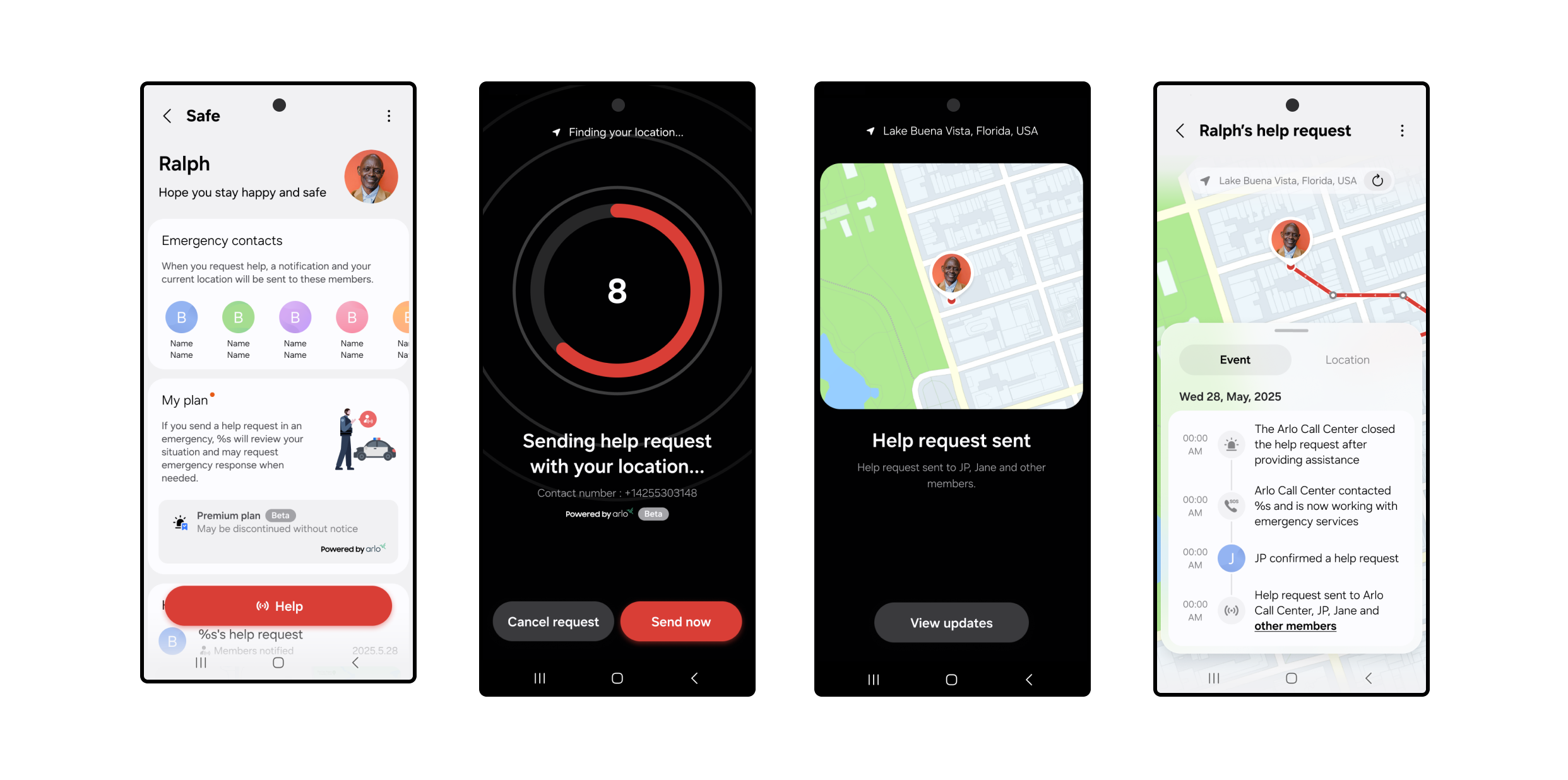
SmartThings Safe Premium is powered by Arlo, a third-party partner that operates the professional monitoring center and coordinates emergency dispatch on our behalf. Feeling safe, whether at home or on the go, shouldn’t take more than a tap. With SmartThings Safe Premium, users can instantly send help requests, from inside the SmartThings app, to Arlo-powered emergency response providers who can send police, fire, or medical help to their exact location. SmartThings Safe includes a Basic plan at no cost; the Premium plan adds 24/7 professional emergency dispatch through Arlo. How It Works When you press the Safe button, a 10-second countdown starts. After 10 seconds, a help request is automatically sent to a professional monitoring center. An Arlo monitoring agent will immediately call and text you to confirm what type of help (fire, police, or medical) is needed.  If they can’t reach you, they’ll request that local emergency responders (police by default) be dispatched to your current GPS location. At the same time, just like the basic plan, your Location Members will receive a push notification with a map of your location and options to call or text you directly. You can cancel your request at any time during the 10-second countdown. Once the alert is created, you can still cancel the request by responding to the monitoring center’s call or text. Setting Up SmartThings Safe Premium  Getting started takes just a few steps: Open the SmartThings app on your mobile device. Tap the Menu icon at the bottom right of the SmartThings app. Select Safe and complete setup, including agreeing to the terms agreement and completing identity verification. Go to My Plan and select Upgrade to Premium Plan. Follow the Samsung Checkout steps to activate your limited-time free access to SmartThings Safe Premium. Once activated, you’ll see your Safe button appear in the app, ready whenever you need it.  Share alerts with the people who matter. Add family or friends to any SmartThings location — home, office, wherever — and they'll stay in the loop automatically.  From the Home tab, tap the three-dot menu in the upper-right corner. Select Location Settings > Invite Members. Enter the Samsung account email addresses of the people you want to add. Added members will need the following to receive Safe alerts: Have the SmartThings app downloaded. Set up their own Samsung account. Tap the Menu icon at the bottom right of the SmartThings app. Tap the Safe icon and follow the prompts to get started. Review and agree to the Terms & Conditions and complete two-factor authentication.  Have notifications turned on to receive Safe alerts. These members will then become emergency contacts for dispatchers and the monitoring center. For even faster access, you can add the Safe button to your Galaxy home screen or Quick Panel by selecting Settings > Add to Home Screen from the device card. Make Sure Location Services Are On To share your real-time GPS location with the monitoring center and your added members using the Safe Premium plan, you’ll need to enable Location Services on your phone.  On Galaxy and Android devices: Go to Settings > Location > App permissions > SmartThings > Allow all the time. On iOS: Go to Settings > Privacy & Security > Location Services > SmartThings > Always and turn on Precise Location. Safe Premium is designed to work when your mobile device has a signal. The service is currently available in the U.S. for supported Galaxy, Android, and iOS devices. Both the Basic and Premium plans of SmartThings Safe are designed for manual, user-triggered help requests, making them a great complement to built-in SOS features on smartphones. While Safe Premium does not currently support automations, routines, or smartwatch-triggered requests, users can receive Safe notifications on Galaxy Watches and Apple Watches. Whether you’re checking in with loved ones or reaching out for help, SmartThings makes it simple to stay safe, connected, and in control. Activate your *limited-time free access to SmartThings Safe Premium in the SmartThings app today.  *SmartThings Safe Premium is currently available as a beta service. Free access may be changed or discontinued without notice.
June 23, 2026

A New Enhanced SmartThings API Experience 

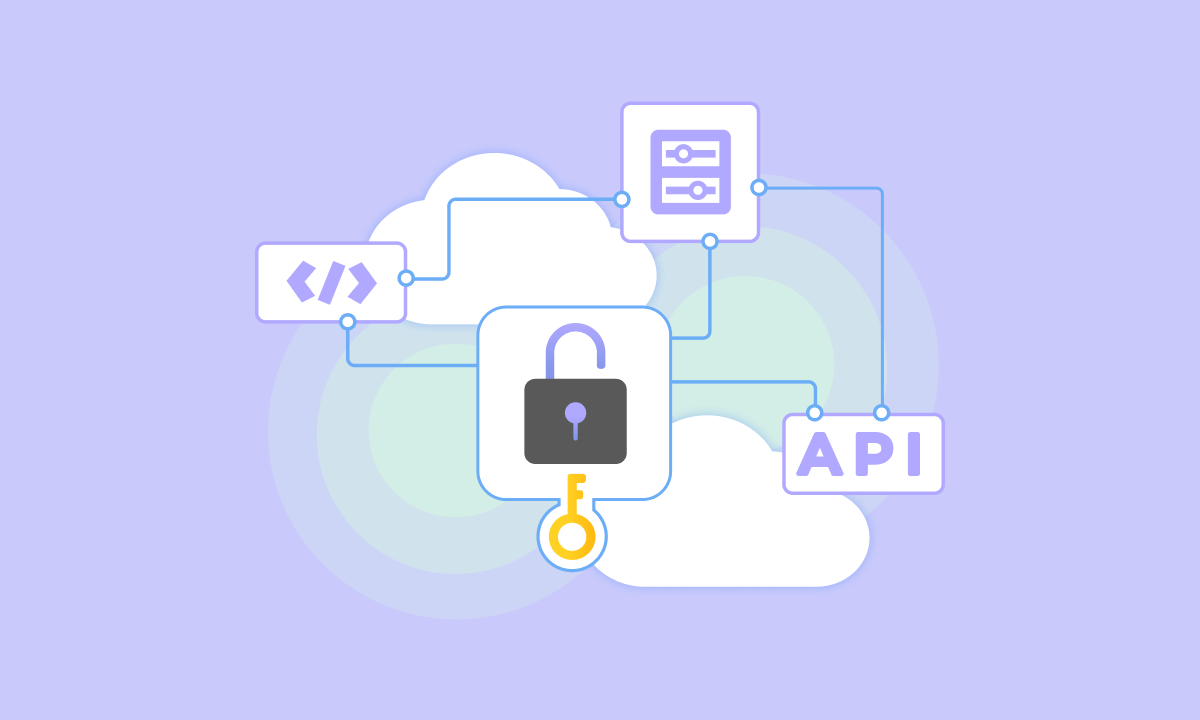
Upcoming Changes to the SmartThings API  Over the last several years, the SmartThings platform has grown into one of the most robust orchestration layers in the smart home industry, with over 460M+ registered users and hundreds of WWST partner brands — and our API is the gateway that connects third party apps and platforms to the SmartThings ecosystem.  Today, our commercial partners use it to power everything from short-term rental platforms and energy management systems to API aggregators and custom smart home dashboards, while our developer community uses our API to optimize their personal smart homes. To ensure the SmartThings API remains capable, reliable, and secure at this scale, we are evolving our infrastructure. In the upcoming months, we will introduce dedicated, paid commercial API tiers as well as a $4.99 a month plan for non-commercial, individual developers. To note, this update does not affect the millions of SmartThings users who use the SmartThings App with thousands of WWST partner devices.   Why are we evolving the SmartThings API?  As our commercial partners and developer community continue to build integrations, they are asking and expecting more from our infrastructure. To support the next generation of smart home innovation at scale, we are transitioning to a structured API model. This evolution allows us to invest heavily in the enterprise-grade features our partners and users have been asking for: Platform Stability: Upgrading our platform to enhance our enterprise-grade reliability required for high-volume, commercial deployments. Optimized Integrations: Building upon our infrastructure to further support scalable integrations.   Expanded Capabilities: Continuing access to Samsung devices such as TVs, smart refrigerators, and more with device states, controls, and health parameters as well as future functionality to build richer integrations. Powering the Next Generation of Smart Home Services:  We’re building on the SmartThings platform, shaped by your feedback, to deliver even more powerful tools for creating premium IoT experiences. The SmartThings API offers different tiers that can support a high rate limit, gives access to our multi-protocol ecosystem (Matter, Cloud-to-Cloud, Zigbee, Z-Wave), and contains deep Samsung integration required to scale your business on our backend and power a variety of use cases, including: Short-Term Rentals, Hospitality, and Property Tech: Automate access control, optimize climate, and enable seamless property management across thousands of units at scale. Telecommunications: Enhance broadband and 5G subscriber apps with premium family care and security solutions. Security: Power smart alarms, access systems, and remote monitoring with our ecosystem of devices and consistent, real-time API data like device states. Senior Care: Enable non-intrusive wellness tracking, activity insights, and automated routines to safely support independent living and aging in place. Family Care: Deliver peace of mind with real-time sensor data, keeping families connected and homes running smoothly. Insurance: Leverage real-time home state data and predictive analytics to proactively prevent damage, reduce risk, and lower claim costs. Energy Management: Build advanced tracking algorithms and cost-saving utility dashboards. With many more use cases and verticals.  New Tools:  Upgraded Developer Experience: We will deliver a new Developer Center experience and refreshed documentation for API users to make the API as easy to use and implement as possible. The API Usage Dashboard: In the new Developer Center, we will be launching a new API Dashboard. This dashboard will allow partners and individual developers to track API call volume with flexible time-series data. The dashboard will give you current usage and data points to optimize your code and determine which pricing tier fits your needs. These updates will make onboarding faster and API management more intuitive.  Next Steps & Timeline: We are targeting availability for the new commercial tiers and personal plan offering in October 2026 – stay tuned for additional details.  Please note: Your current API usage will not be interrupted today. We are announcing this now to give our API users ample time to prepare for the transition.  Free access will remain available through Q3. We will not begin applying the new usage limits or phasing out free access until October 2026. For Current Commercial Partners: Please reach out to us at partners@smartthings.com to ensure a seamless transition.   For Current Personal Users: We will share more information detailing the full timeline, transition guidelines, and paid plan.  New to the SmartThings API? Are you evaluating SmartThings as the backend for your business? We are currently onboarding new partners to discuss SmartThings API capabilities, pricing, and scalability. Please fill out our form to learn more. Thank you for building with SmartThings. Our investment in our API and transition to a paid model are efforts to provide an incredible service that will continue to support your needs.     — The Samsung SmartThings Team

Showcase Partner Brands and Products to Millions of SmartThings Users 

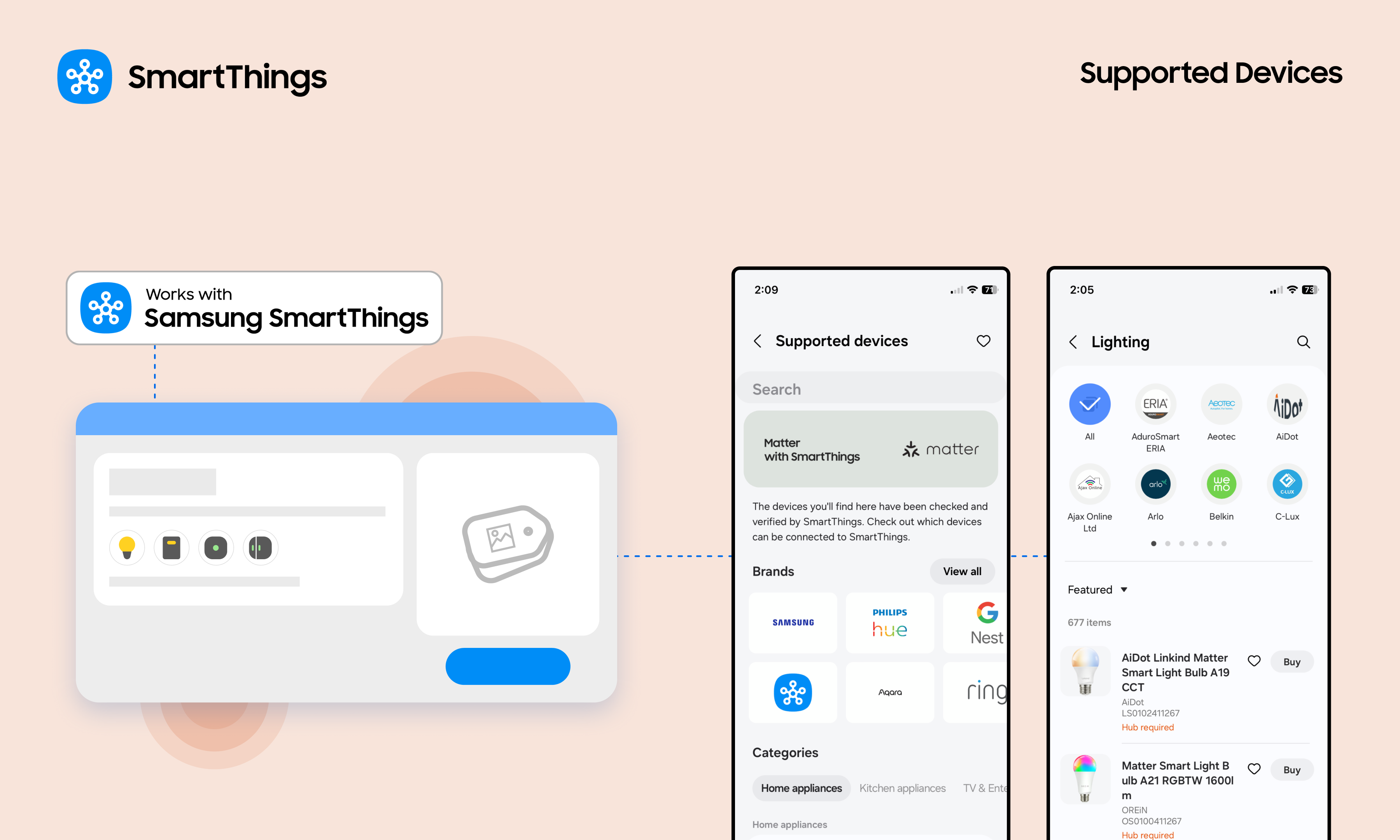
The Easy Steps for Partners to Update Brand and Product Pages We’re happy to share an exciting new feature that lets Works with SmartThings (WWST) partners manage their brand and certified product pages, seen by millions of SmartThings users. Partner brand pages, found on Partners.SmartThings.com and in the SmartThings app, are some of the most frequently visited resources. These pages are often the first place users go to discover new brands and confirm product compatibility before making a purchase. Additionally, because they are visible to everyone across the entire web, they expand partner’s reach and strengthen search engine optimization (SEO) for their brand and products. Now, partners can manage their brand and product pages to showcase offerings and encourage user purchases. Partners can follow these simple steps to update brand and product pages. An Easy Way to Showcase Brands and Certified Products This new feature is a key benefit of the Works with SmartThings (WWST) program. It enables partners to easily keep their brand and product information current, including the latest purchase links, for SmartThings users. The WWST program offers many benefits, such as: Opportunities to promote products to 450 million global SmartThings users Brand and product placement on the SmartThings website and within the app Use of the WWST badge Co-marketing opportunities Access to user engagement analytics Increased discoverability and trust from SmartThings users What Partners Can Update For Brands: Brand Name Brand URL Brand Description  Logo Customer Support Information  Company Contact Information  Contact Name For Products: Product Name Product Description  Model Number Product Images Product Category Purchase Links Product Distribution Locations How to Update: A Step-by-Step Guide For partners that already have an account linked to brands in the SmartThings Console, partners can start updating information immediately.  For partners without an account or if the brands are not linked, please contact the SmartThings team at partners@smartthings.com. 1. Access the SmartThings Console Access the Console by signing in to the SmartThings Developer Center. From the homepage, use the left-hand navigation to choose the path: Brands, for updating brand information, or Device Integrations for updating product information.  2. Refresh Brand Information Navigate: Click the Brands tab. Edit: Click the brand and select Edit Brand at the bottom right.  Make Updates: Update brand details, including logos, customer support information, and more. Submit: Update the details, check the permission box in the "Ready to submit?" section, and click Update Brand. 3. Update Product Information Navigate: Click the Device Integrations tab. Select: Click on the specific product name to edit. Refine: Update product details, including product names, model numbers, product images, purchase links, and more. Submit: Update the details, check the permission box in the "Ready to submit?" section, and click Update Product. 4. Review and Approval Once approved, the updated brand and product details will go live in the SmartThings app (please note a brief delay may occur due to caching). Updates will typically appear on the web-based partner brand page within 5-7 business days. Update Brand and Product Pages Today Partners can now make these updates in the SmartThings Developer Center today!
April 20, 2026

Samsung SmartThings Expands Seamless Integration With IKEA Matter Devices

SmartThings, Samsung Electronics’ global smart home platform, has built enhanced integrations with furniture retailer IKEA’s new smart home product line. Samsung Electronics has enabled seamless integration of IKEA’s 25 practical Matter-over-Thread smart home devices—including smart bulbs and plugs—into the SmartThings platform, allowing users to effortlessly incorporate them into daily life. Easy Integration with SmartThings Through Matter-Enabled IKEA Devices 25 IKEA smart home devices including a scroll wheel remote, smart bulbs, plugs, temperature and humidity sensors, air quality sensors, motion sensors, door sensors and water leak sensors, now support the global smart home standard Matter.1 Previously, connecting IKEA devices to SmartThings required an IKEA smart home hub2 and SmartThings hub, but they can now be connected directly to a SmartThings hub. They also work with Samsung appliances including TVs, air conditioners and washing machines, as well as a wide range of third-party devices and protocols supported by the platform. Smarter Care — From Checking on Loved Ones to Optimizing Sleep Environments For example, users can connect an IKEA door sensor to SmartThings and attach it to a frequently used door to monitor when their parents start their day and whether they are active at home through SmartThings Family Care. This offers a convenient way to check on loved ones, even when living apart. Installed on a wall, IKEA’s air quality and temperature and humidity sensors collect data on temperature, humidity, carbon dioxide levels and light intensity. SmartThings compares these readings with recommended ranges for optimal sleep and provides a sleep environment report with actionable insights — such as lowering the temperature to 19-21°C — helping create an ideal bedroom environment. Users can also set routines that activate the air conditioner’s dehumidification mode when rising humidity is detected. If the water leak sensor detects moisture, it sends an immediate alert enabling a prompt response. Intuitive Control With the Scroll Wheel Remote Ahead of launch, Samsung and IKEA conducted multiple rounds of validation to enhance connectivity stability and implemented a dedicated user experience within the SmartThings app for full compatibility. A standout device is the scroll wheel remote, which significantly enhances user experience. When connected to lighting, users can precisely adjust brightness and color temperature by rotating the wheel, making it easy to create the desired ambiance. It can also be used for devices requiring fine control, such as blinds.3 It targets the design-conscious younger generation, who prioritizes aesthetic value in every detail, down to a single switch or lighting.  Expanding a Boundless Smart Home Ecosystem With Early Adoption of Thread SmartThings was the first to adopt Thread4 1.4 — a low-power, short-range networking technology essential for smart home ecosystems — enabling Thread networks across brands to operate as a single unified system that enhances user convenience. “By connecting IKEA devices to SmartThings, even first-time smart home users can enjoy a familiar and easy connectivity experience without financial burden,” said Jaeyeon Jung, Executive Vice President of SmartThings, AI Platform Center at Samsung Electronics. “SmartThings will continue to expand its ecosystem through partnerships, enabling more consumers to enjoy seamless and convenient smart home experience within the platform regardless of brand or protocol.” 1 Matter is a global smart home connectivity standard developed by the Connectivity Standards Alliance to improve interoperability among devices. 2 Hub is a central smart home device that connects multiple smart devices using different wireless protocols and enables unified control through a single platform. 3 As of April 1, 2026, only lighting control is supported. blind control will be available later this year. 4 Thread is a low-power, mesh networking-based wireless protocol used in the Matter standard that enables smart home devices to communicate with each other quickly and reliably independent of Wi-Fi.
April 15, 2026

Samsung Elevates Experiences to Care for Users and Their Families with SmartThings Update

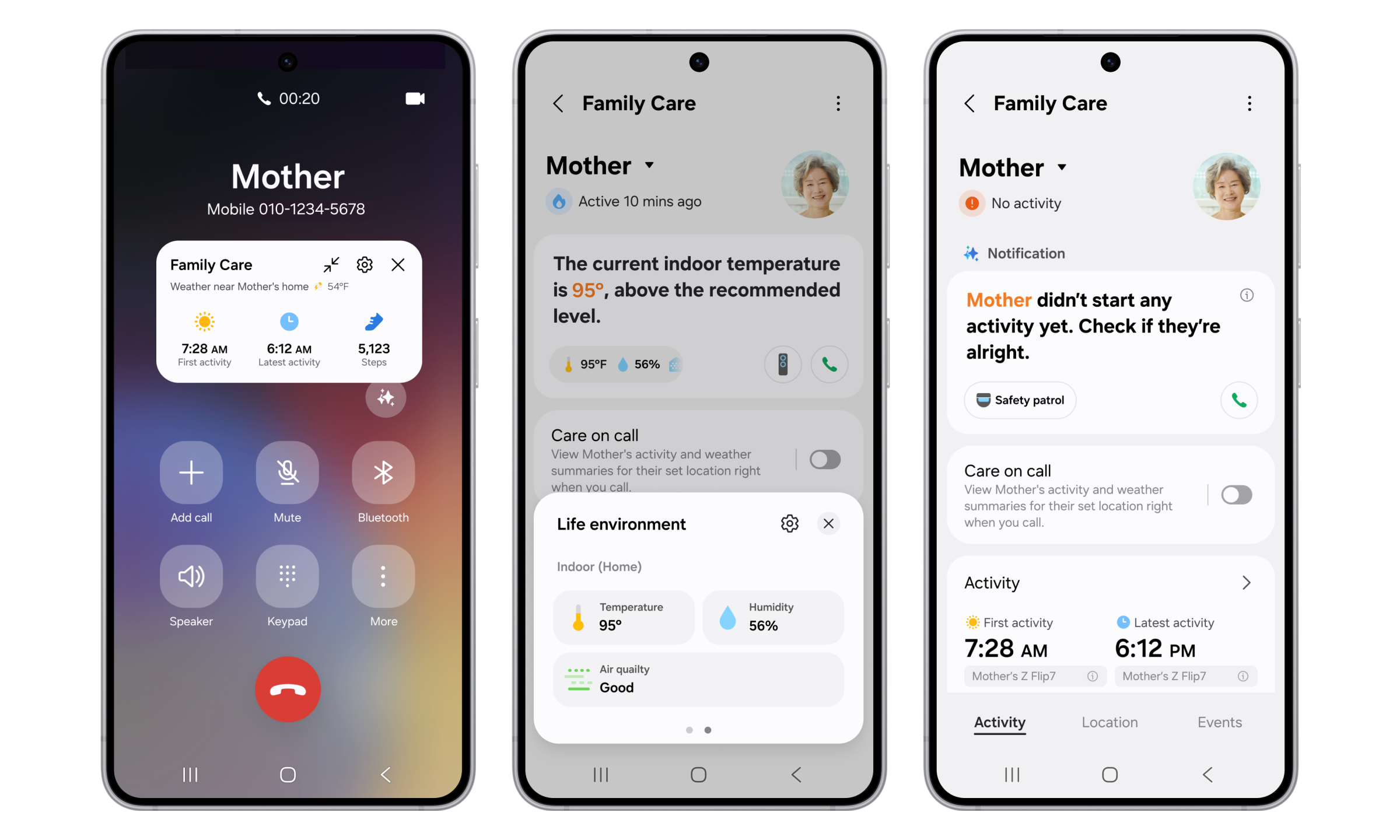
Enhanced SmartThings Family Care provides more thoughtful support for families living apart Galaxy Now Brief integrates Home Security, Family Care and Pet Care and expands to TVs and Family Hub refrigerators SEOUL, Korea – April 16, 2026 – Samsung Electronics Co., Ltd. today announced that it has updated its global smart home platform SmartThings to provide improved experiences that help users better care for their families and themselves in everyday life. With the latest update, SmartThings has strengthened its Family Care service so users can better support parents they live apart from. It also integrates additional key SmartThings features into Now Brief, the personalized briefing service available on Galaxy mobile devices, to further enhance the convenience and comfort of the customer's daily life. Samsung plans to roll out these new Now Brief capabilities to TVs and Family Hub refrigerators in phases. “Samsung’s AI technology goes beyond everyday convenience to help users care for themselves and their families with greater peace of mind,” said Jaeyeon Jung, Executive Vice President and Head of the SmartThings Team, AI Platform Center, Samsung Electronics. “SmartThings will continue to strengthen its role as a platform that seamlessly connects customers’ daily lives with AI, and it will keep expanding differentiated services on an ongoing basis.” Enhanced Family Care Makes It Easier To Check In on Loved Ones Family Care connects SmartThings with a range of home appliances and mobile devices to provide notifications regarding the activities of users’ aging parents and reminders for medication and hospital visits — as well as location-based alerts. With this update, the service enables even more thoughtful care. Additionally, Samsung’s new Care on Call1 feature allows users to more closely check on the status of the care recipient through a simple phone call. When a caregiver using the service calls the care recipient, a floating pop-up that displays key information like the time of the first activity of the day, the most recent activity time and the local weather — all at a glance — appears before the call begins. This helps caregivers ask more meaningful check-in questions and respond accordingly. SmartThings can also continuously monitor devices like air conditioners, air purifiers, dehumidifiers and humidifiers for indoor temperature, humidity and air quality. If unusual usage patterns are detected, the caregiver is immediately notified and can remotely control the relevant device.2 Family Care has made the Safety Patrol feature — which utilizes SmartThings to send a new Bespoke AI Jet Bot Steam Ultra to check various areas around the house — even more convenient. If the care recipient’s activity is not detected for a specified period of time, users receive a notification and the feature can be remotely activated if the caregiver needs to take action.3 Using a camera built into the robot vacuum, caregivers can view issues that might occur — such as a person lying incapacitated — and two-way communication through the built-in speaker and microphone allows them to act. To further enhance the level of care provided to loved ones, the Care Insight feature has been enhanced to provide even more actionable, long-term data within the Family Care service. It analyzes factors like temperature and humidity levels, paying attention to whether they deviate from optimal ranges. It also tracks significant changes in activity levels and connected device usage compared to the previous week.  Expansion of Now Brief to TVs and Family Hub Now Brief delivers a rich AI experience by integrating a broad range of key SmartThings services that help users stay informed about their daily lives, their family members and conditions inside and outside the home. With the launch of the Galaxy S26 series, Now Brief will support Home Security, Family Care and Pet Care, in addition to existing features that include Home Insight, Energy and the Sleep Environment Report. Through Now Brief, users can access the useful information needed to care for themselves, their families and their homes at a glance.  Now Brief is set to deliver a consistent customized experience throughout the home4, and will soon roll out in phases to TVs launched in 2024 or later, as well as Family Hub refrigerators launched in 2021 or later. For added convenience, users will not need to manually launch Now Brief. If the feature is set up in advance, it will be automatically activated when they approach the TV, touch the Family Hub refrigerator screen or open and close the refrigerator door. And now, whether at home or on the go, the expanded Now Brief helps users stay up to date by providing information such as home device status and energy usage, as well as the sleep status of the previous night, Home Security updates based on door locks, door sensors, and security mode, parents’ daily activity updates and dog-walking information.5 About Samsung Electronics Co., Ltd. Samsung inspires the world and shapes the future with transformative ideas and technologies. The company is redefining worlds of TVs, digital signage, smartphones, wearables, tablets, home appliances and network systems, as well as memory, system LSI and foundry. Samsung is also advancing medical imaging technologies, HVAC solutions and robotics, while creating innovative automotive and audio products through Harman. With its SmartThings ecosystem, open collaboration with partners, and integration of AI across its portfolio, Samsung delivers a seamless and intelligent connected experience. For the latest news, please visit the Samsung Newsroom at news.samsung.com. 1 Care on Call is available on Galaxy smartphones running One UI 8.5 or later. Internet calls are not supported. 2 Remote control is available when the caregiver has been set up to remotely control the care recipient's devices. 3 Remote control is available when the caregiver has been set up to remotely control the care recipient's devices. Availability may vary depending on product, model and region. 4 Availability may vary depending on product, model, region, and each product’s Over The Network (OTN) software update schedule.  5 The relevant devices should be registered in SmartThings, and the service must be activated in the Life tab.
April 15, 2026

Your Galaxy Is Your New Front Door Key

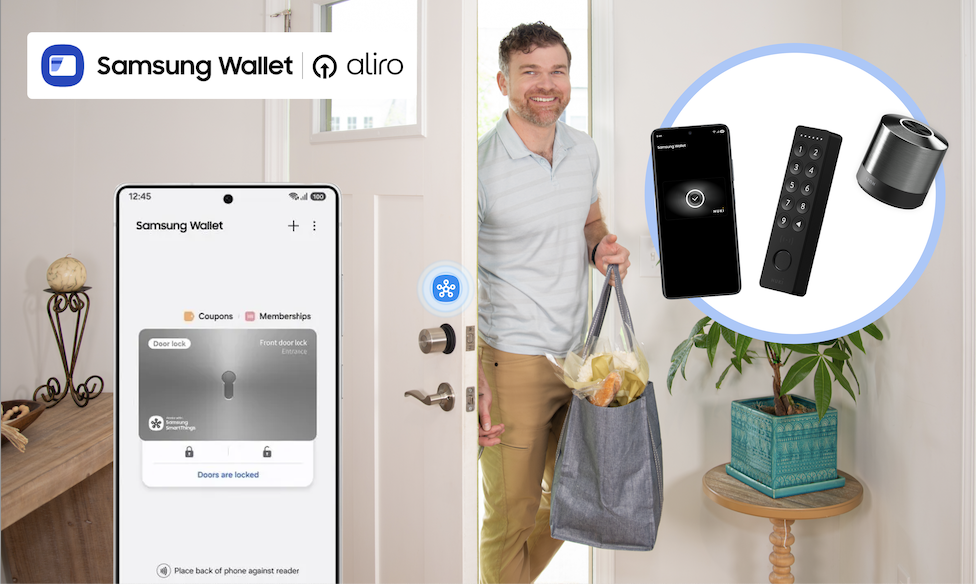
Samsung Wallet, Aliro Locks, and SmartThings turn a simple tap into total home control What if getting into your home didn’t require fumbling for keys, digging through bags, or wondering whether you locked the door on your way out? With the Samsung Wallet, SmartThings, and Aliro-certified smart locks from trusted brands like Aqara, Nuki, ULTRALOQ, and Schlage, your Galaxy phone can become your new door key, unlocking a smarter, safer, and more convenient home experience. Now available on Samsung.com, Aliro-certified locks integrate with SmartThings and Samsung Wallet, giving you tap-to-unlock access, remote control, and powerful home automations that start the moment you walk through the door. Tap to Unlock. Walk Right In. Ever arrive home from a run with nowhere to stash your keys? Instead of slowing down, soon you can simply tap your Galaxy phone on your smart lock. The door unlocks instantly, no physical keys required. Samsung Wallet securely stores your digital keys, while SmartThings keeps everything connected behind the scenes. It’s a simple gesture that makes everyday routines feel effortless. Unlocking your door can trigger far more than just entry. When paired with SmartThings and a compatible hub, Aliro-certified smart locks can become the starting point for your entire home: Lights turn on as you step inside Thermostat adjusts to your preferred temperature Security cameras shift modes Alarms disarm and re-arm automatically Heading out? Lock the door from your phone when you leave, and SmartThings takes care of the rest, shutting off lights or securing devices so you can leave with peace of mind. Designed for Real-Life Moments Technology should make life easier, especially in the moments that matter most. Active lifestyles: Going for a run or walking the dog? Leave your keys behind. Your Galaxy has you covered. Locked-out scares: Step outside to take out the trash and hear the door click shut? No panic required, tap your phone and get back in. Family members: Share secure digital keys with family members through Samsung Wallet, and use SmartThings to manage alarms and routines while they’re inside. Members added to SmartThings can use a designated PIN as well to use the features.  Built for What’s Next: Aliro-Certified Smart Locks Samsung’s tap-to-unlock experience is powered by Aliro Home Key certification, an industry standard created to make digital access to your home more secure, reliable, and interoperable across devices. Aliro-certified smart locks will work seamlessly with Galaxy phones through Samsung Wallet, delivering consistent tap-to-unlock access whether you’re coming home from work, heading out for a run, or letting in a guest remotely. And this ecosystem is growing. Samsung is partnering with a broad range of Aliro-certified lock makers, including Aqara, Nuki, and Allegion brands like Schlage, giving homeowners more flexibility and choice when upgrading their front door. That means confidence today and peace of mind that your home is ready for what comes next. How to Set Up an Aliro-Certified Lock with Galaxy Getting started is easier than you might think. Step 1: Install Your Aliro-Certified Lock Follow the manufacturer’s instructions to physically install your lock. Step 2: Add the Lock in the SmartThings App Open the SmartThings app. Tap Add device and follow the on-screen prompts to connect your lock. Step 3: Add Your Digital Key to Samsung Wallet Once connected, you’ll receive the option to add your home key to Samsung Wallet. Confirm and authenticate, your Galaxy phone is now your key. Step 4: Test Tap-to-Unlock Hold your Galaxy phone near the lock. Tap. Unlock. Done. Want a Routine to try? Try This! Routine Name: “I’m Home!” Trigger: When front door unlocks Actions: Turn on entryway and living room lights Adjust thermostat to comfort setting Disarm security system Turn on Samsung TV Plus automatically  Now your home responds automatically the moment you walk in. You can customize this routine for mornings, evenings, guests, or even specific users. Ready to upgrade? Shop the Aliro-compatible smart locks, Galaxy Devices, and SmartThings hubs now on Samsung.com and fully unlock your home’s potential.
April 6, 2026

How to Activate the SmartThings Hub Built Into Your Samsung TV

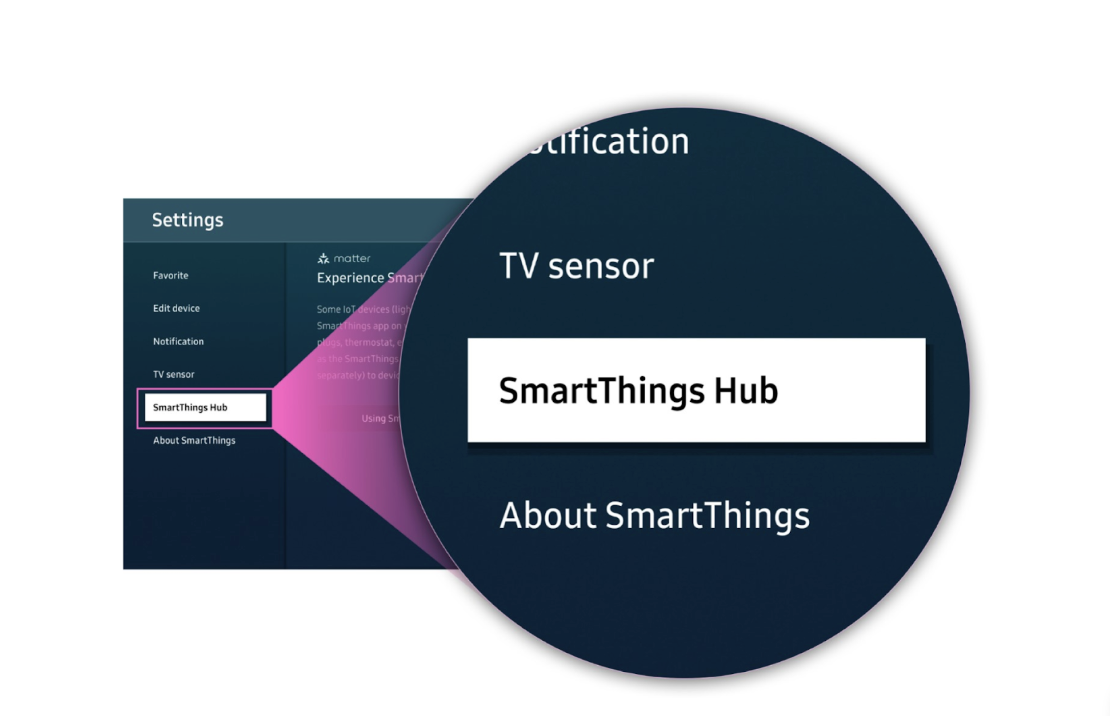
Did you know your Samsung TV can double as a SmartThings Hub? Many 2024 and newer models come with the hub built in, which means no extra device is needed. With just a few steps, you can turn your TV into the heart of your smart home and instantly start connecting devices. Read on for a step-by-step guide to activate your SmartThings Hub.  How it Works There are two easy ways to activate the SmartThings Hub built into your TV: directly from your mobile phone using the SmartThings app, or through the SmartThings app on your TV. Both options follow a similar flow, connect your TV, enable the hub, and start adding devices, so you can choose whichever is most convenient for you. Activate the Hub Using Your Galaxy  If you already use SmartThings on your phone, this is often the fastest way to get started. Step 1: Turn On Your TV Make sure your Samsung TV is powered on and connected to Wi-Fi. Step 2: Open SmartThings on Your Phone Launch the SmartThings app on your mobile device.  Confirm you’re signed in with the same Samsung account used on your TV. Step 3: Find Your TV Tap Devices in the app.  Select your TV from the list. Step 4: Open Hub Settings Tap the Featured icon at the bottom SmartThings Hub shows up on the next screen  Step 5: Activate the Hub Follow the on-screen prompts to turn the hub On. Wait while SmartThings connects to your TV and completes setup. Once finished, your TV is officially activated as a SmartThings Hub. Activate the Hub Using Your TV You can also turn on the hub directly from your TV using the built-in SmartThings app. Step 1: Turn on Your TV Make sure your Samsung TV is powered on and connected to Wi-Fi. Step 2: Open the SmartThings App on Your TV Press the Home button on your remote. Scroll over to Connected Devices Navigate to and open the SmartThings app. Step 3: Access Settings Select the Settings icon (cog wheel) in the SmartThings app. This may also be featured already on the home page. Scroll down and choose SmartThings Hub. Step 4: Activate the Hub Toggle SmartThings Hub to On. The Hub is now active! Step 5: Add Devices Once your Hub is activated: In the SmartThings app, tap + Add device. Scan for Matter or other supported devices. Import them into SmartThings. That’s It! Your Samsung TV is now a fully functioning SmartThings Hub. From here, you can control smart lights, plugs, sensors, and more, all without additional hardware.  With the Hub activated, your TV becomes more than just a screen; it’s now the command center for your connected home. Whether you’re dimming lights for movie night, automating your thermostat when you leave home, or linking new Matter devices as they hit the market, SmartThings makes it seamless.  Need devices to start building out your smart home? Shop them now at https://www.samsung.com/us/smartthings/all-smartthings/ 
December 18, 2025

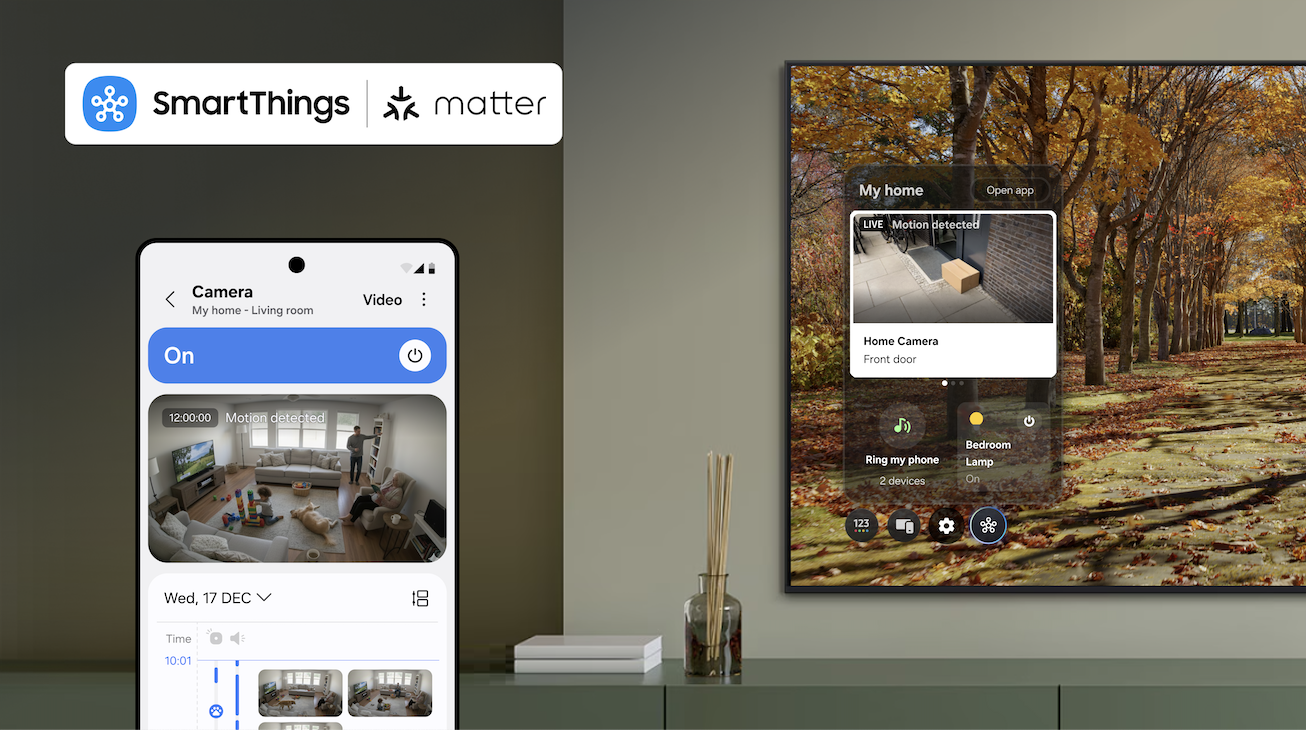
SmartThings Expands Camera Support with Introduction of Matter 1.5

As the first smart home ecosystem to support Matter 1.5 compatible cameras, SmartThings is partnering with Aqara, Eve and Xthings, to bring users comprehensive security and safety monitoring features. SmartThings, Samsung’s AI Home platform, is the first global smart home platform to support Matter-compatible cameras as a fully supported device category, enabling users access to comprehensive security and safety monitoring experiences within a single platform across brands on the latest specification, Matter 1.5.   Matter cameras are essential for any smart home, providing reliable security and monitoring for indoor and outdoor spaces. With this update, SmartThings users can seamlessly integrate cameras alongside lights, locks, sensors, and other Matter-enabled devices to create a unified and secure smart home experience. To bring these capabilities to market, SmartThings is partnering with Aqara, Eve and Xthings.  Each company will bring its own Matter-compatible camera to market in early 2026, all of which will be supported by SmartThings. And now, manufacturers can deploy Matter cameras without building separate APIs, simplifying development and accelerating time to market. Launched in November by the Connectivity Standards Alliance (CSA), Matter 1.5 brings cameras into the standard and enhances support for blinds, awnings, and garage doors, giving users more control and improving energy efficiency throughout the home. “As one of the first platforms to support Matter 1.5, SmartThings underscores its commitment to delivering the best possible experience for our users,” said Mark Benson, Head of Samsung SmartThings. “Our leadership in Matter has allowed us to build one of the largest and fastest-growing libraries of supported and certified Matter devices, enabling users to integrate new Matter devices with confidence.” With the Matter 1.5 update, SmartThings’ support for Matter cameras will include: Live streaming — Watch your home in real time from anywhere. Clip storage — Securely save and access video recordings. Two-way talk — Communicate through your camera. Motion detection — Receive alerts for movement in or around your home. Advanced camera settings – Customize preferences to suit your needs. Event history — See a timeline of event notifications. Motion and privacy zones — Block zones from reporting motion and from clear view to protect your privacy.  Together, these features will be accessible directly through SmartThings Hubs (Aeotec Smart Home Hub 2, Aeotec Smart Home Hub, SmartThings Hub 2018, and the ThingsOne Smart Home Hub) at initial launch, with updates to come in 2026 to SmartThings Hub 2015, making it easier than ever to manage connected devices from a single platform. SmartThings continues to lead in smart home innovation by rapidly rolling out support for Matter standards just as it has done with every Matter release to date. Today, SmartThings supports 58 Matter device types through the 1.5 specification, and this update also opens the door for new Works With SmartThings-certified partners to bring cameras to millions of households worldwide. "Partnering with SmartThings to bring our Matter-certified camera to their platform is an important milestone for Aqara," said Cathy You, Senior Vice President of Global Business and Strategy at Aqara. "This integration gives users a secure, intelligent, and seamless home monitoring experience, and paves the way for a future of connected living with even more innovative Matter-enabled devices in the future. We look forward to continuing our long-term partnership with SmartThings to drive the mass adoption of smart home technology." With Matter 1.5, SmartThings is strengthening its position as an open, unified and trusted smart home platform, helping its base of over 425 million users create safer, smarter, and more connected homes. For more information, visit www.samsung.com/smartthings.