In this Article

SmartThings Safe Premium is powered by Arlo, a third-party partner that operates the professional monitoring center and coordinates emergency dispatch on our…

1. How It Works

2. Setting Up SmartThings Safe Premium 

3. Make Sure Location Services Are On

Share this Blog Post

SmartThings Safe Premium is powered by Arlo, a third-party partner that operates the professional monitoring center and coordinates emergency dispatch on our behalf.
Feeling safe, whether at home or on the go, shouldn’t take more than a tap. With SmartThings Safe Premium, users can instantly send help requests, from inside the SmartThings app, to Arlo-powered emergency response providers who can send police, fire, or medical help to their exact location.

SmartThings Safe includes a Basic plan at no cost; the Premium plan adds 24/7 professional emergency dispatch through Arlo.

How It Works

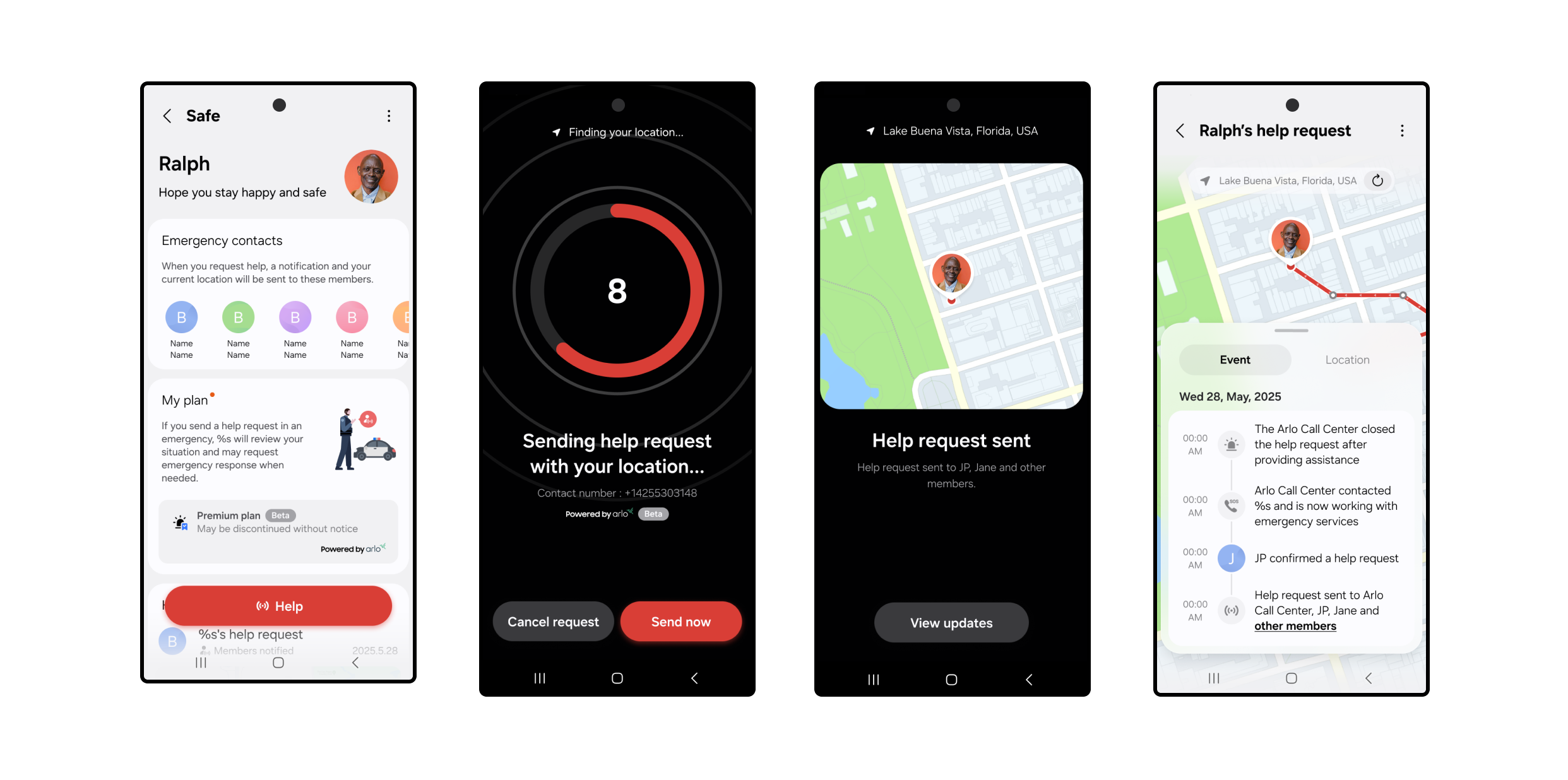
When you press the Safe button, a 10-second countdown starts. After 10 seconds, a help request is automatically sent to a professional monitoring center.

  • An Arlo monitoring agent will immediately call and text you to confirm what type of help (fire, police, or medical) is needed.
  •  If they can’t reach you, they’ll request that local emergency responders (police by default) be dispatched to your current GPS location.
  • At the same time, just like the basic plan, your Location Members will receive a push notification with a map of your location and options to call or text you directly.

You can cancel your request at any time during the 10-second countdown. Once the alert is created, you can still cancel the request by responding to the monitoring center’s call or text.

Setting Up SmartThings Safe Premium 
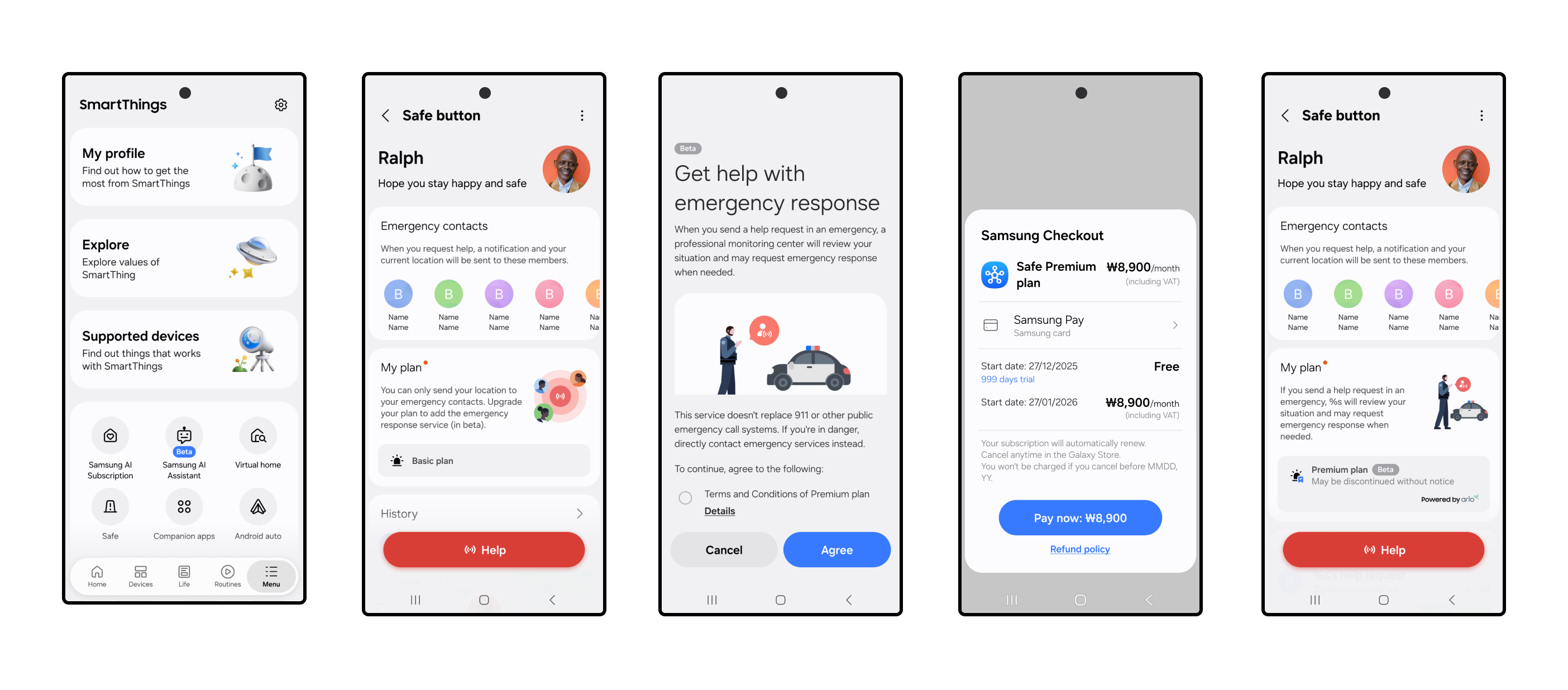
Getting started takes just a few steps:

  • Open the SmartThings app on your mobile device.
  • Tap the Menu icon at the bottom right of the SmartThings app.
  • Select Safe and complete setup, including agreeing to the terms agreement and completing identity verification.
  • Go to My Plan and select Upgrade to Premium Plan.
  • Follow the Samsung Checkout steps to activate your limited-time free access to SmartThings Safe Premium.
  • Once activated, you’ll see your Safe button appear in the app, ready whenever you need it. 

Share alerts with the people who matter. Add family or friends to any SmartThings location — home, office, wherever — and they’ll stay in the loop automatically. 

  • From the Home tab, tap the three-dot menu in the upper-right corner.
  • Select Location Settings > Invite Members.
  • Enter the Samsung account email addresses of the people you want to add.

Added members will need the following to receive Safe alerts:

  • Have the SmartThings app downloaded.
  • Set up their own Samsung account.
  • Tap the Menu icon at the bottom right of the SmartThings app.
  • Tap the Safe icon and follow the prompts to get started.
  • Review and agree to the Terms & Conditions and complete two-factor authentication. 
  • Have notifications turned on to receive Safe alerts.

These members will then become emergency contacts for dispatchers and the monitoring center.

For even faster access, you can add the Safe button to your Galaxy home screen or Quick Panel by selecting Settings > Add to Home Screen from the device card.

Make Sure Location Services Are On

To share your real-time GPS location with the monitoring center and your added members using the Safe Premium plan, you’ll need to enable Location Services on your phone.

  •  On Galaxy and Android devices: Go to Settings > Location > App permissions > SmartThings > Allow all the time.
  • On iOS: Go to Settings > Privacy & Security > Location Services > SmartThings > Always and turn on Precise Location.

Safe Premium is designed to work when your mobile device has a signal. The service is currently available in the U.S. for supported Galaxy, Android, and iOS devices. Both the Basic and Premium plans of SmartThings Safe are designed for manual, user-triggered help requests, making them a great complement to built-in SOS features on smartphones. While Safe Premium does not currently support automations, routines, or smartwatch-triggered requests, users can receive Safe notifications on Galaxy Watches and Apple Watches.

Whether you’re checking in with loved ones or reaching out for help, SmartThings makes it simple to stay safe, connected, and in control.

Activate your *limited-time free access to SmartThings Safe Premium in the SmartThings app today. 

*SmartThings Safe Premium is currently available as a beta service. Free access may be changed or discontinued without notice.

Subscribe for more articles like this!

Your email address
[contact-form-7 id="831e457" title="Contact form"] You may opt-out at any time. Privacy Policy.

Learn more about becoming a SmartThings partner.
Work With Us

Inspire the world and create the future of IoT at SmartThings.

You Might Also Like...

SmartThings Updates

August 14, 2014

SmartThings, Samsung, and the Open Platform

Friends, Today is a big day for SmartThings. I’m excited to announce that SmartThings has been acquired by Samsung and will operate as an independent company within Samsung’s Open Innovation Center group. It has always been our goal to create a totally open smart home platform that brings together third-party developers, device makers, and consumers. We’re thrilled that Samsung fully supports this vision. We will continue to run SmartThings the way we always have: by embracing our community of customers, developers, and device makers and championing the creation of the leading open platform for the smart home. Our growing team will remain fully intact and will relocate to a new headquarters in Palo Alto, CA. In short: SmartThings will remain SmartThings. (more…)
Read More
SmartThings Updates

March 31, 2015

Update: SmartThings Hub & Hardware V2

Earlier this year we announced that we’ll soon unveil the next generation of the SmartThings Hub and several sensors. We wanted to provide a quick update on our progress to date. (more…)
Read More
SmartThings Updates

September 3, 2015

The Next Generation of SmartThings is Here

We’re excited to announce that the next generation of the Samsung SmartThings Hub, a new lineup of products, and a brand-new SmartThings app experience is available today. Our mission has always been to create the easiest way for people to turn their home into a smart home. In fact, we started SmartThings out of a desire to know the answer to a basic but deeply personal question: is everything OK in my home.  We believe our latest product evolution delivers on this ambition. Here's a look at what's new and improved: The New Samsung SmartThings Hub and Sensors The new Hub enables video streaming, has battery backup that lasts up to 10 hours, and can run certain functions locally to improve performance and continue to operate without an internet connection. The Hub will continue to support ZigBee, Z-Wave, and local internet connected devices. Two USB ports and embedded Bluetooth will support future expansion. The new collection of Samsung SmartThings sensors are now smaller and have been redesigned with a sleeker, more contemporary look to fit seamlessly into the background of your home. The New SmartThings App Experience The free SmartThings app has been redesigned for easier navigation and a more intuitive experience.  You can now directly organize and control your connected devices by room, view live streaming from cameras, quickly set up and run routines, explore the marketplace of nearly 200 devices now compatible with SmartThings, and so much more. One of the exciting new features of the SmartThings app experience is Smart Home Monitor– an integrated home monitoring solution. Smart Home Monitor allows you to receive alerts and take action when SmartThings detects unwanted entry or motion, smoke or fire, leaks, or other important activity. Existing customers will be able to configure Smart Home Monitor from their dashboard within 24 hours after downloading the updated app. With Smart Home Monitor, our Hub version 2, and a connected camera, you can also get instant alerts with an accompanying video-clip when these unexpected events occur.  Video buffering in the new hub means clips can start prior to the event so you can see exactly what is happening in your home. Video clips will eventually be a premium feature within Smart Home Monitor but are available in beta as a free trial through 2015. After the free trial, a premium version of Smart Home Monitor, which includes video clips, will be available for $4.99 per month. Live streaming will always be free. The new SmartThings app will be available for free download on iOS and Android starting today, with Apple Watch, and Gear S apps to follow. Be sure to check out our post for a more in-depth look at the app’s new features. We would like to extend our heart-felt thanks to our customers, supporters, and developer community. Your commitment, feedback, and ideas are what make our open platform truly special. We hope you you enjoy the new SmartThings experience.    
Read More

Our Most Popular Categories