Samsung Wallet, Aliro Locks, and SmartThings turn a simple tap into total home control
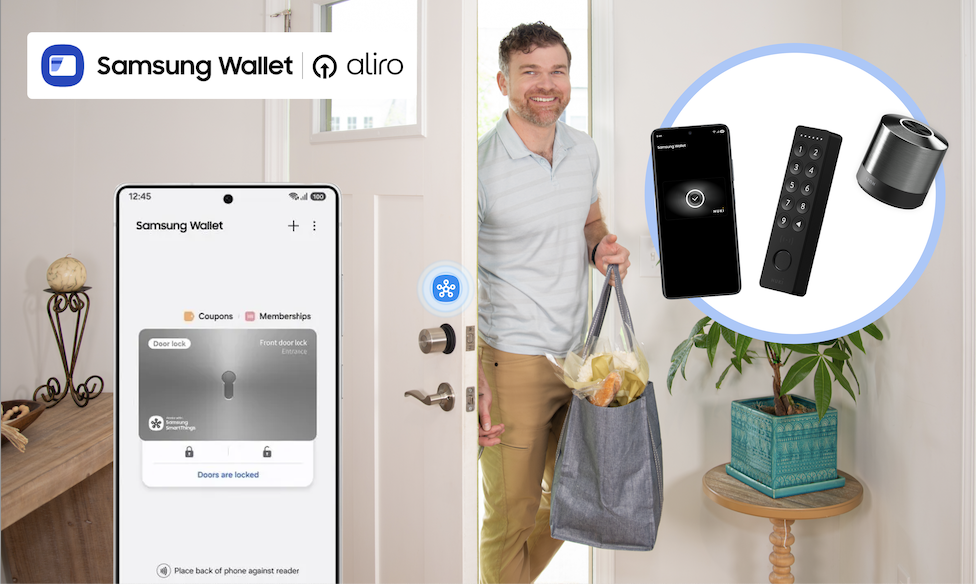
What if getting into your home didn’t require fumbling for keys, digging through bags, or wondering whether you locked the door on your way out? With the Samsung Wallet, SmartThings, and Aliro-certified smart locks from trusted brands like Aqara, Nuki, ULTRALOQ, and Schlage, your Galaxy phone can become your new door key, unlocking a smarter, safer, and more convenient home experience.
Now available on Samsung.com, Aliro-certified locks integrate with SmartThings and Samsung Wallet, giving you tap-to-unlock access, remote control, and powerful home automations that start the moment you walk through the door.
Tap to Unlock. Walk Right In.
Ever arrive home from a run with nowhere to stash your keys?
Instead of slowing down, soon you can simply tap your Galaxy phone on your smart lock. The door unlocks instantly, no physical keys required. Samsung Wallet securely stores your digital keys, while SmartThings keeps everything connected behind the scenes. It’s a simple gesture that makes everyday routines feel effortless.
Unlocking your door can trigger far more than just entry. When paired with SmartThings and a compatible hub, Aliro-certified smart locks can become the starting point for your entire home:
- Lights turn on as you step inside
- Thermostat adjusts to your preferred temperature
- Security cameras shift modes
- Alarms disarm and re-arm automatically
Heading out? Lock the door from your phone when you leave, and SmartThings takes care of the rest, shutting off lights or securing devices so you can leave with peace of mind.
Designed for Real-Life Moments
Technology should make life easier, especially in the moments that matter most.
Active lifestyles: Going for a run or walking the dog? Leave your keys behind. Your Galaxy has you covered.
Locked-out scares: Step outside to take out the trash and hear the door click shut? No panic required, tap your phone and get back in.
Family members: Share secure digital keys with family members through Samsung Wallet, and use SmartThings to manage alarms and routines while they’re inside. Members added to SmartThings can use a designated PIN as well to use the features.
Built for What’s Next: Aliro-Certified Smart Locks
Samsung’s tap-to-unlock experience is powered by Aliro Home Key certification, an industry standard created to make digital access to your home more secure, reliable, and interoperable across devices.
Aliro-certified smart locks will work seamlessly with Galaxy phones through Samsung Wallet, delivering consistent tap-to-unlock access whether you’re coming home from work, heading out for a run, or letting in a guest remotely.
And this ecosystem is growing.
Samsung is partnering with a broad range of Aliro-certified lock makers, including Aqara, Nuki, and Allegion brands like Schlage, giving homeowners more flexibility and choice when upgrading their front door.
That means confidence today and peace of mind that your home is ready for what comes next.
How to Set Up an Aliro-Certified Lock with Galaxy
Getting started is easier than you might think.
Step 1: Install Your Aliro-Certified Lock
- Follow the manufacturer’s instructions to physically install your lock.
Step 2: Add the Lock in the SmartThings App
- Open the SmartThings app.
- Tap Add device and follow the on-screen prompts to connect your lock.
Step 3: Add Your Digital Key to Samsung Wallet
- Once connected, you’ll receive the option to add your home key to Samsung Wallet.
- Confirm and authenticate, your Galaxy phone is now your key.
Step 4: Test Tap-to-Unlock
- Hold your Galaxy phone near the lock.
- Tap. Unlock. Done.
Want a Routine to try? Try This!
Routine Name: “I’m Home!”
Trigger: When front door unlocks
Actions:
- Turn on entryway and living room lights
- Adjust thermostat to comfort setting
- Disarm security system
- Turn on Samsung TV Plus automatically
Now your home responds automatically the moment you walk in.
You can customize this routine for mornings, evenings, guests, or even specific users.
Ready to upgrade? Shop the Aliro-compatible smart locks, Galaxy Devices, and SmartThings hubs now on Samsung.com and fully unlock your home’s potential.
Popular Tags
Subscribe for more articles like this!
Your email address
[contact-form-7 id="831e457" title="Contact form"] You may opt-out at any time. Privacy Policy.Learn more about becoming a SmartThings partner.
Work With Us
Inspire the world and create the future of IoT at SmartThings.