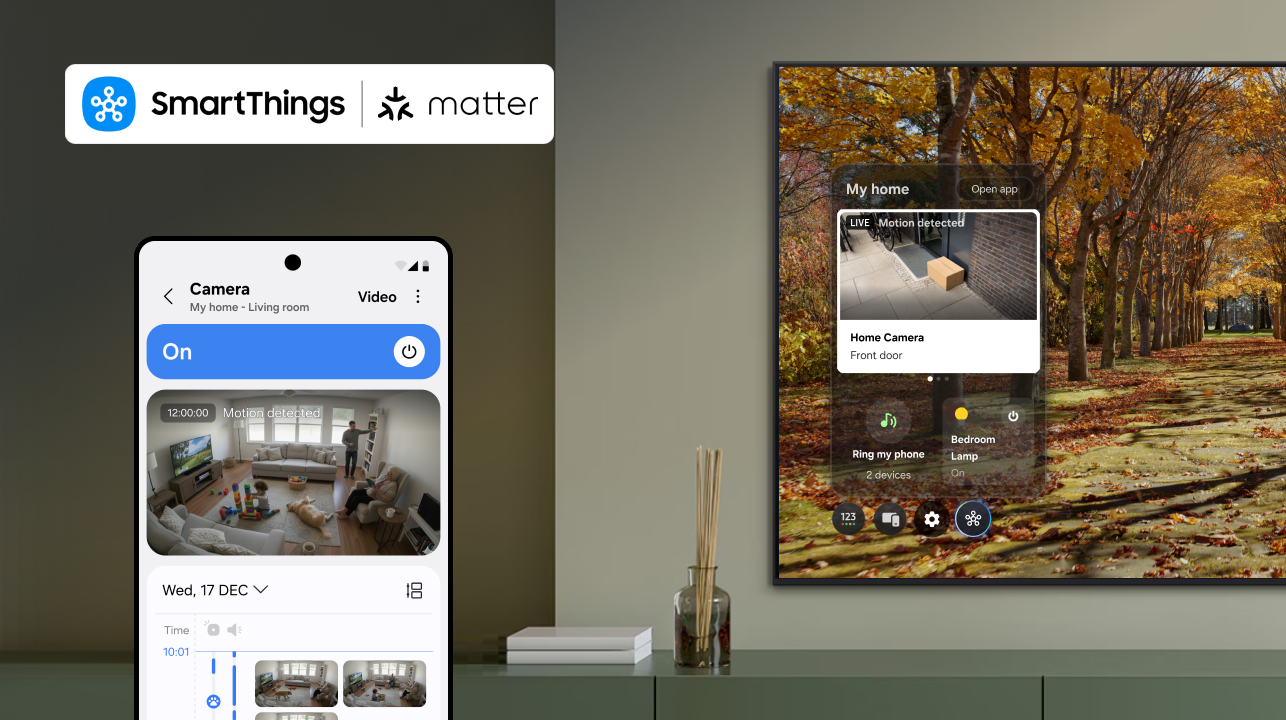
SmartThings, Samsung’s AI Home platform, is the first global smart home platform to fully support Matter cameras, letting users combine their choice of cameras into a unified smart home security experience. Aqara, Eve, and Xthings are the first Works With SmartThings camera partners, and as SmartThings hubs, the Aeotec Smart Home Hub 2, Aeotec Smart Home Hub, SmartThings Hub 2018, and ThingsOne Smart Home Hub support them at launch.
Key takeaways
- SmartThings supports Matter 1.5 cameras alongside lights, locks, sensors, and other Matter devices in one app.
- Features include live streaming, two-way talk, motion detection, clip storage, event history, and motion and privacy zones.
- Aqara, Eve, and Xthings are the first partners, and manufacturers can deploy Matter cameras without building separate APIs.
What Does Matter 1.5 Add to SmartThings?
Matter cameras are essential for smart homes, providing reliable security and monitoring for indoor and outdoor spaces. With this update, SmartThings users can seamlessly integrate cameras alongside lights, locks, sensors, and other Matter-enabled devices to create a unified smart home security experience.
Aqara, Eve, and Xthings each bring their own Matter-compatible camera to SmartThings. Manufacturers can deploy Matter cameras without needing to use ecosystem-specific APIs, which speeds up development and time to market.
Launched by the Connectivity Standards Alliance (CSA), Matter 1.5 brings cameras into the standard and enhances support for blinds, awnings, and garage doors, giving users more control and improving energy efficiency throughout the home.
“As one of the first platforms to support Matter 1.5, SmartThings underscores its commitment to delivering the best possible experience for our users. Our leadership in Matter has allowed us to build one of the largest and fastest-growing libraries of supported and certified Matter devices, enabling users to integrate new Matter devices with confidence.”
— Mark Benson, Head of Samsung SmartThings US
What Features Do SmartThings Matter Cameras Support?
With the Matter 1.5 update, SmartThings’ support for Matter cameras includes:
| Feature | What It Does |
| Live streaming | Watch your home in real time from anywhere |
| Clip storage | Securely save and access video recordings |
| Two-way talk | Communicate through your camera |
| Motion detection | Receive alerts for movement in or around your home |
| Advanced camera settings | Customize preferences to suit your needs |
| Event history | See a timeline of event notifications |
| Motion and privacy zones | Select specific zones within the camera view to report motion detection and trigger clip recording, ignoring unwanted noise |
Which SmartThings Hubs Support Matter Cameras?
At launch, these hubs support Matter cameras directly:
- Aeotec Smart Home Hub 2
- Aeotec Smart Home Hub
- SmartThings Hub 2018
- ThingsOne Smart Home Hub
How Can SmartThings Matter Cameras Help With Pets, Kids, and Family?
SmartThings puts your Matter cameras, lights, locks, and sensors in one app, so you can look after pets, children, and aging relatives without juggling separate apps.
Checking on Pets
How can I check on my dog or cat while I’m at work?
Live streaming lets you watch your pet in real time from anywhere, and two-way talk lets you speak to them through the camera. Motion detection sends an alert when there is movement, so you do not have to monitor throughout the day.
How do I know if my pet is okay home alone during the day?
Event history gives you a timeline of motion notifications, and clip storage lets you review recordings later to see what happened while you were out. Motion zones let you focus alerts on the areas that matter, such as a pet bed or a doorway.
How do I get alerts about unusual pet activity?
Set up motion detection alerts for the rooms where your pet spends the day, then use the event timeline to spot activity at unexpected times. SmartThings supports remote pet check-ins with the Jet Bot Combo AI robot vacuum cleaner, adding an optional second view of the home.
Looking In on Aging Parents and Family Members
How can I check on an elderly parent who lives far away?
Live streaming works from anywhere, and motion alerts and the event history timeline show new activity at home.
How can technology help without making a parent feel watched all the time?
Motion and privacy zones block selected areas from reporting motion and from clear view, so bedrooms and bathrooms stay private. Alerts and the event timeline let you review activity when something happens, rather than watching a live feed all day. For broader day-to-day monitoring of a loved one’s activity and wellbeing, see our companion article on SmartThings Family Care.
Keeping Kids Safe After School
How do I know my child got home safely from school?
Place a camera where your child comes in and turn on motion detection. You will get an alert when there is movement, and clip storage and event history let you confirm the time they arrived.
What if my child is home alone and someone comes to the door?
A camera that covers the entryway lets you see who is there with live streaming and speak to them with two-way talk, without your child having to open the door. SmartThings supports Matter locks and sensors, and routines combine cameras, locks, and sensors in one app.
How can I stay in touch with my child while I’m at work?
Two-way talk lets you speak through a camera in the home, and motion alerts tell you when your child has arrived.
For check-ins that don’t rely on a camera catching the moment, see our companion article on SmartThings Family Care: Care on Call and Safety Patrol.
One System for Pets, Kids, and Parents
How can one system help me manage pets, kids, and aging parents? SmartThings works with a wide variety of brands, so cameras, lights, locks, and sensors from different manufacturers sit side by side. One set of alerts and one place to monitor make it simple to look after your household.
Matter Camera: Frequently Asked Questions
What is a Matter camera?
A Matter camera is a camera built on the Matter 1.5 specification, the open smart home standard that allows devices from different brands to work together. SmartThings is the first global smart home platform to add Matter-compatible cameras as a fully supported device category.
Can I use cameras from different brands in one app?
Yes. SmartThings supports Matter cameras alongside lights, locks, sensors, and other Matter-enabled devices across brands, all in a single platform.
Which brands offer Matter cameras for SmartThings?
Aqara, Eve, and Xthings are the first partners, and the update opens the door for additional Works With SmartThings-certified partners to bring cameras to millions of households worldwide.
Which SmartThings Hubs support Matter cameras?
At launch, the Aeotec Smart Home Hub 2, Aeotec Smart Home Hub, SmartThings Hub 2018, and ThingsOne Smart Home Hub support Matter cameras.
“Partnering with SmartThings to bring our Matter-certified camera to their platform is an important milestone for Aqara. This integration gives users a secure, intelligent, and seamless home monitoring experience, and paves the way for a future of connected living with even more innovative Matter-enabled devices in the future. We look forward to continuing our long-term partnership with SmartThings to drive the mass adoption of smart home technology.”
— Cathy You, Senior Vice President of Global Business and Strategy at Aqara
With Matter 1.5, SmartThings is strengthening its position as an open, unified, and trusted smart home platform, helping its base of over 425 million users create safer, smarter, and more connected homes.
Popular Tags
Subscribe for more articles like this!
Your email address
[contact-form-7 id="831e457" title="Contact form"] You may opt-out at any time. Privacy Policy.Learn more about becoming a SmartThings partner.
Work With Us
Inspire the world and create the future of IoT at SmartThings.