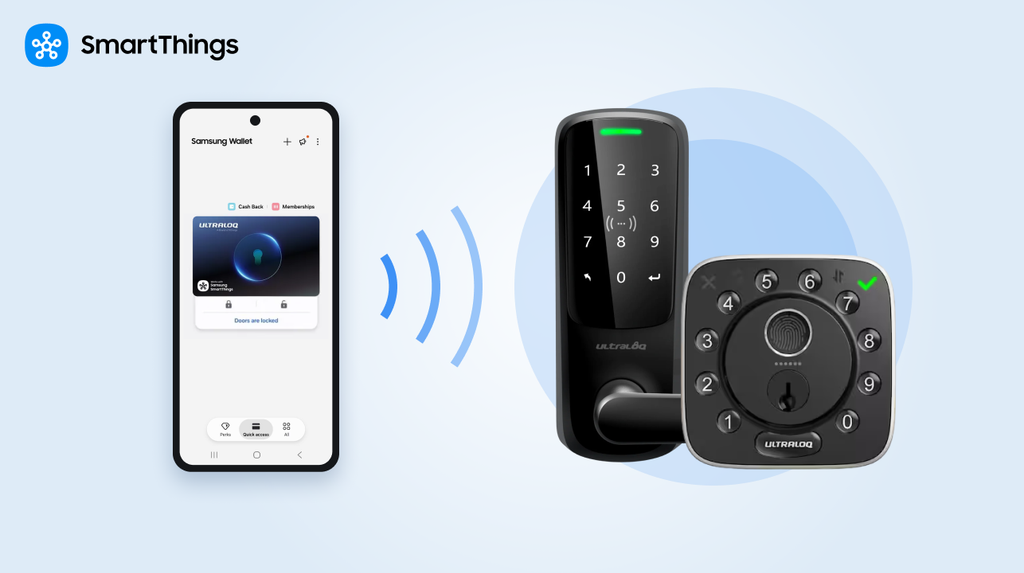
Smart locks are becoming more seamlessly integrated into the connected home, making everyday access simpler and more intuitive. ULTRALOQ’s Bolt Pro and Latch 5 Pro build on that evolution. Built on Aliro, an open digital-key standard, both locks let a phone’s existing mobile wallet act as the key—and both connect to SmartThings, where unlocking the door can trigger the rest of the home to respond.
What Is Aliro, and Why Does It Matter for Smart Locks?
Aliro is an open mobile-access standard developed by the Connectivity Standards Alliance — the same organization behind Matter. Aliro lets a phone’s digital wallet hold a home’s key the same way it already holds a credit card or transit pass, using the wallet’s existing tap-to-unlock hardware rather than a dedicated lock-brand app.
Aliro brings the trusted, Samsung Wallet experience people already use for payments to the front door.
What’s New: ULTRALOQ Bolt Pro and Latch 5 Pro
| Bolt Pro | Latch 5 Pro | |
|---|---|---|
| Format | Deadbolt | Lever |
| MSRP | $269.99 | $249.99 |
| Best for | Front doors | Side entrances, garages, home offices, rentals, shared spaces |
| Certifications | Aliro, Matter | Aliro, Matter |
| Access methods | Samsung Wallet, fingerprint, PIN, app, physical key | Samsung Wallet, fingerprint, PIN, app, physical key |
Both locks let a household member unlock the door with a tap of a phone or watch, no app required to open first. Backup methods — fingerprint, PIN codes for kids or service providers, and a physical key — cover the cases a digital key can’t.
Why SmartThings Is the Hub for Aliro Door Locks
An Aliro-compatible door lock is only part of the equation, the platform managing that lock determines how much value it adds beyond “the door opens.” Connecting an ULTRALOQ Bolt Pro or Latch 5 Pro to SmartThings adds:
- Matter-driven automation: Unlocking the door can trigger a custom SmartThings routine — entryway lights on, thermostat adjusted, cameras switched to home mode — automating your arrival without any extra steps.
- A key for everyone in the home: Every member of a SmartThings Location can create their own Digital Home Key through Samsung Wallet, with the household’s automations applying to everyone who has one.
- Cross-brand interoperability: Because Aliro and Matter are both open, Connectivity Standards Alliance-governed standards, the same lock works across different operating systems, and across other Matter-certified devices in the home.
- A hub for your entire home: SmartThings connects your lock with thousands of other smart devices. Whether it’s cameras, lighting, or climate systems, your whole ecosystem can be managed and automated from one unified place.
Setting Up Your ULTRALOQ Lock With SmartThings
- Confirm you have a SmartThings-compatible hub — Aliro and Matter pairing both require one.
- Add the ULTRALOQ Bolt Pro or Latch 5 Pro in the SmartThings app.
- Activate your Samsung Wallet Digital Home Key from the lock’s device card.
- Build a routine — for example, an “I’m Home” routine that turns on entryway lighting and adjusts the thermostat when the lock opens.
- Add other household members to your SmartThings Location so they can create their own Digital Home Key.
Frequently Asked Questions
What is Aliro?
Aliro is an open mobile-access standard from the Connectivity Standards Alliance that lets compatible phones and wallets act as a digital key for doors, without requiring a dedicated app.
Do I need a SmartThings hub to connect an Aliro lock to Samsung Wallet?
Yes. To connect an Aliro lock with Samsung Wallet and SmartThings, a compatible SmartThings hub is required. For a list of compatible hubs, check out our blog, Where did all the Hubs Go, They’re Everywhere!.
Can I use ULTRALOQ with iOS and Android devices?
Yes. Because Aliro is a cross-platform standard, the same lock works across multiple operating systems, so every phone in the household can carry a key. On Galaxy, that key lives in Samsung Wallet. Digital Key support varies by Galaxy model and Android version — see Samsung’s device compatibility list for details.
I already own an ULTRALOQ lock — do I need to upgrade?
Only Bolt Pro and Latch 5 Pro are Aliro-compatible today, so they’re the only ULTRALOQ locks that support the Samsung Wallet Digital Home Key. Older models can still connect to SmartThings for basic lock and unlock control, but not the wallet-based tap-to-unlock experience.
What happens if my phone dies or I don’t have it with me?
Both locks include fingerprint recognition, PIN code entry, and a physical key backup, so a digital key is never the only way in.
Does connecting my lock to SmartThings replace the ULTRALOQ app?
No — it adds to it. The lock still works with ULTRALOQ’s own app and other supported platforms; SmartThings adds home-wide automation on top.
Popular Tags
Subscribe for more articles like this!
Your email address
[contact-form-7 id="831e457" title="Contact form"] You may opt-out at any time. Privacy Policy.Learn more about becoming a SmartThings partner.
Work With Us
Inspire the world and create the future of IoT at SmartThings.