In this Article

Lighting moves in real time with music through SmartThings Music Sync, creating a seamless, in-the-moment experience from the first beat to the…

Share this Blog Post

Lighting moves in real time with music through SmartThings Music Sync, creating a seamless, in-the-moment experience from the first beat to the last.
SmartThings Music Sync and Nanoleaf Header Image

Lighting shapes the entire experience of a space, influencing how it looks, feels, and functions from the moment you walk in. With SmartThings expanding its partnership with Nanoleaf, your lights don’t just turn on and off, they respond to what you’re doing, what you’re listening to, and the kind of moment you want to create.

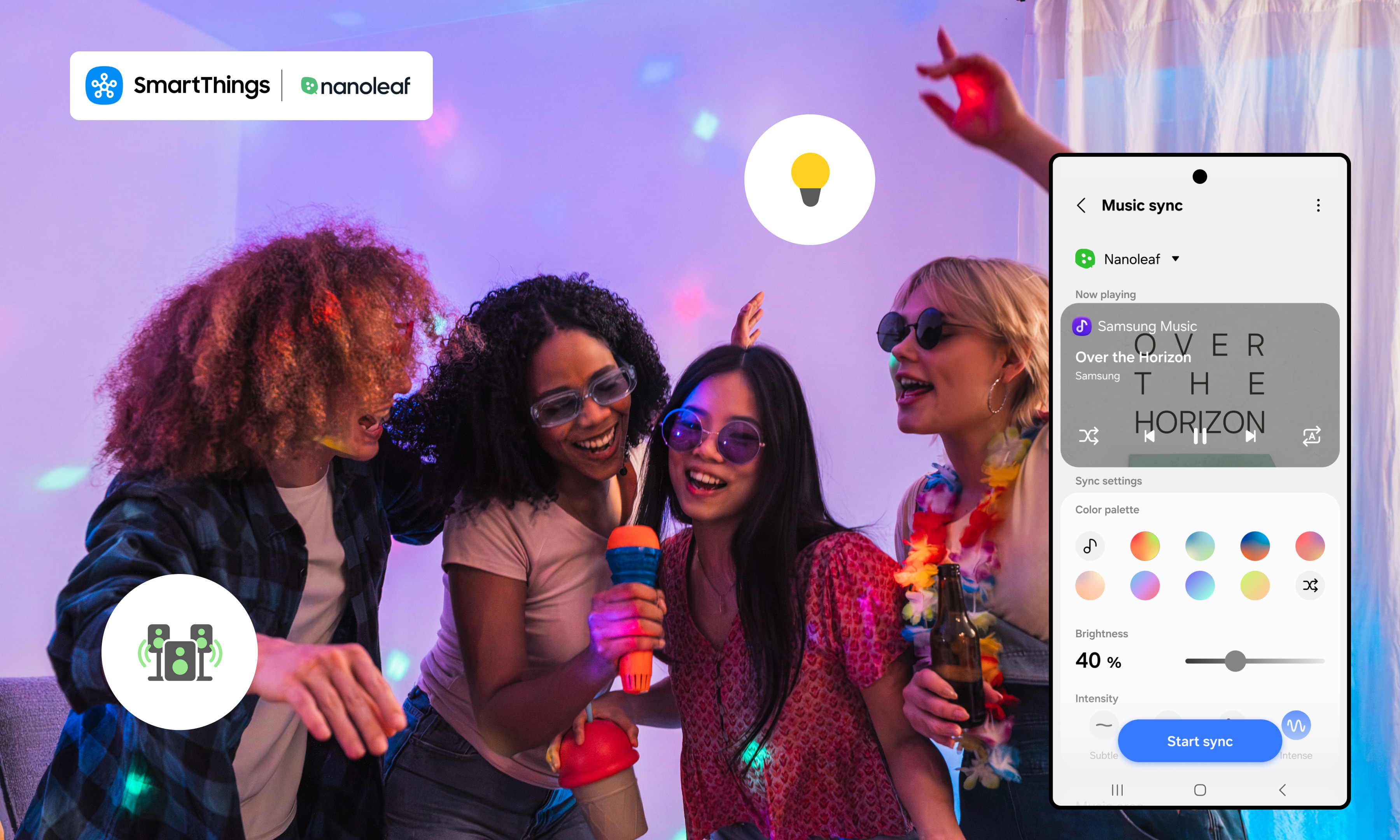
Whether you’re starting your day, hosting friends, or putting on your favorite playlist, your lighting becomes part of the experience. SmartThings Music Sync connects your lighting directly to your music, so your lights move in real time with what you’re playing. The result is a more seamless, in-sync experience that feels intentional from the first beat – right from your Galaxy device.

Turn Your Space Into a Living Visualizer

Nanoleaf is known for bold, colorful lighting and animated scenes, but with SmartThings Music Sync, that experience becomes more intentional and immersive.

Instead of reacting to sound in the room, SmartThings connects directly to your music source from your Galaxy device, so your Nanoleaf lights move in sync with what you’re actually playing. Every beat, drop, and transition feels precise. No guesswork. No delays.

Whether you’re gaming, watching, or listening, your lighting keeps up in real time, bringing a new level of energy to every moment and turning your space into a living, breathing visualizer.

Elevate Your Gaming Experience

Gaming is all about immersion and lighting can take it even further.

With SmartThings Music Sync and Nanoleaf, your space responds in real time as you play. Background music, in-game soundtracks, and audio cues are reflected through dynamic lighting that shifts with the intensity of the moment.

Exploring a new world? Your lighting sets the tone.
In the middle of a fast-paced match? Colors pulse with the action.
Winding down post-game? Your space transitions with you.

It adds another layer to the experience, one that pulls you deeper into what you see, hear, and feel. 

A Full Experience, Not Just Lighting

Lighting is just one part of the moment. With SmartThings, your Nanoleaf setup can work alongside other devices to create a more complete experience. Start a routine and your lights, music, and speakers can respond together.That means your space doesn’t just change, it comes together.

Start a playlist and your environment responds instantly. No switching between apps. No extra steps. Just a setup that works the way you expect it to.

Choose the Mood, Everything Follows

SmartThings makes it easy to build routines that fit your day.

From your Galaxy device, you can set up automations like:

  • Lights gradually brightening in the morning
  • A wind-down routine with softer tones at night
  • A party setup that activates music sync and dynamic scenes
  • Lights turning off when you leave

Once it’s set, everything runs in the background, so your space is always ready when you are.
SmartThings Music Sync and Nanoleaf Setup Screens

Easy to Get Started

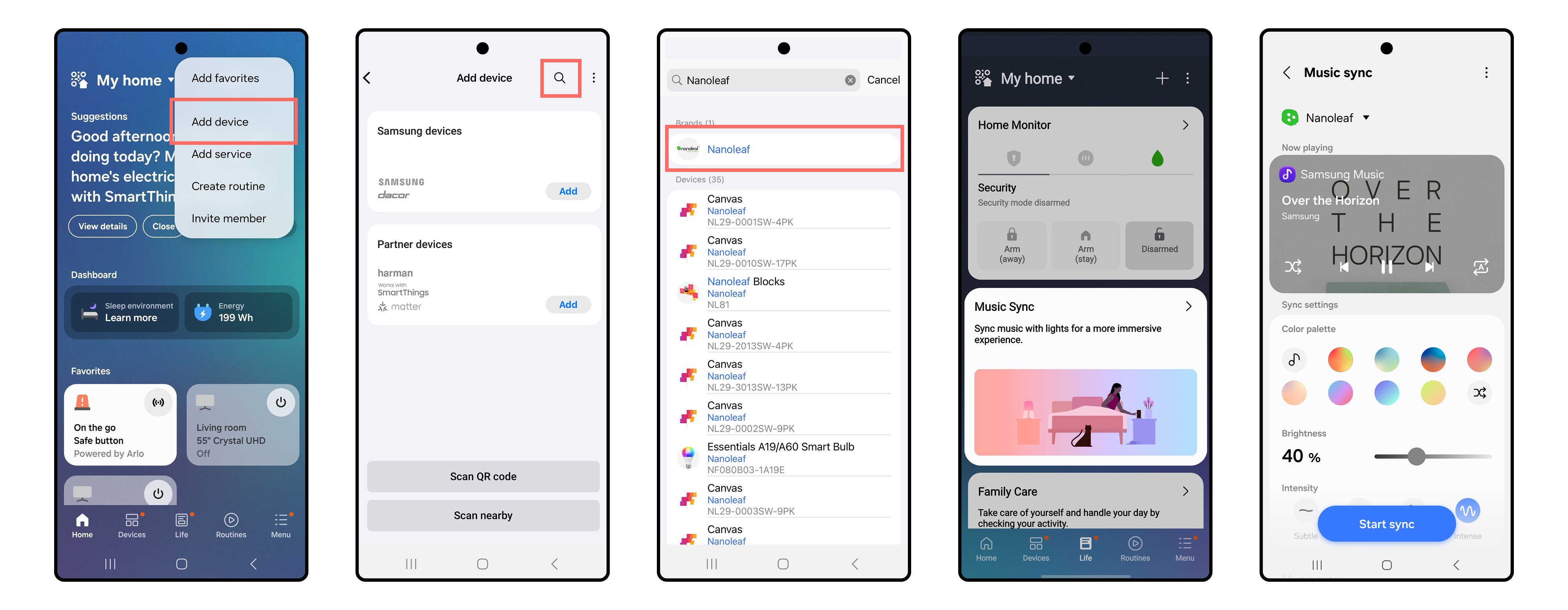
Adding Nanoleaf to SmartThings only takes a few steps:

  1. First, make sure you have a hub available
  2. Open the SmartThings app on your Galaxy device
  3. Tap the “+” icon and select “Add device”
  4. Search for  Nanoleaf and select your device
  5. Follow the prompts to connect

From there, you can group your lights, create automations, and start building routines right away. 

After setting up your routines, go to the Life tab within the SmartThings app. Select Music Sync and follow the prompts to complete the sync with your Nanoleaf devices.

A Space That Feels Just Right

Your space should adapt to you, not the other way around. With Nanoleaf and SmartThings, lighting becomes something more personal. It shifts with your mood, keeps up with your music, and helps create moments that feel effortless. Bring your space to life today and visit partners.smartthings.com/partners/nanoleaf to learn more.

Subscribe for more articles like this!

Your email address
[contact-form-7 id="831e457" title="Contact form"] You may opt-out at any time. Privacy Policy.

Learn more about becoming a SmartThings partner.
Work With Us

Inspire the world and create the future of IoT at SmartThings.

You Might Also Like...

SmartThings Updates

August 14, 2014

SmartThings, Samsung, and the Open Platform

Friends, Today is a big day for SmartThings. I’m excited to announce that SmartThings has been acquired by Samsung and will operate as an independent company within Samsung’s Open Innovation Center group. It has always been our goal to create a totally open smart home platform that brings together third-party developers, device makers, and consumers. We’re thrilled that Samsung fully supports this vision. We will continue to run SmartThings the way we always have: by embracing our community of customers, developers, and device makers and championing the creation of the leading open platform for the smart home. Our growing team will remain fully intact and will relocate to a new headquarters in Palo Alto, CA. In short: SmartThings will remain SmartThings. (more…)
Read More
SmartThings Updates

March 31, 2015

Update: SmartThings Hub & Hardware V2

Earlier this year we announced that we’ll soon unveil the next generation of the SmartThings Hub and several sensors. We wanted to provide a quick update on our progress to date. (more…)
Read More
SmartThings Updates

September 3, 2015

The Next Generation of SmartThings is Here

We’re excited to announce that the next generation of the Samsung SmartThings Hub, a new lineup of products, and a brand-new SmartThings app experience is available today. Our mission has always been to create the easiest way for people to turn their home into a smart home. In fact, we started SmartThings out of a desire to know the answer to a basic but deeply personal question: is everything OK in my home.  We believe our latest product evolution delivers on this ambition. Here's a look at what's new and improved: The New Samsung SmartThings Hub and Sensors The new Hub enables video streaming, has battery backup that lasts up to 10 hours, and can run certain functions locally to improve performance and continue to operate without an internet connection. The Hub will continue to support ZigBee, Z-Wave, and local internet connected devices. Two USB ports and embedded Bluetooth will support future expansion. The new collection of Samsung SmartThings sensors are now smaller and have been redesigned with a sleeker, more contemporary look to fit seamlessly into the background of your home. The New SmartThings App Experience The free SmartThings app has been redesigned for easier navigation and a more intuitive experience.  You can now directly organize and control your connected devices by room, view live streaming from cameras, quickly set up and run routines, explore the marketplace of nearly 200 devices now compatible with SmartThings, and so much more. One of the exciting new features of the SmartThings app experience is Smart Home Monitor– an integrated home monitoring solution. Smart Home Monitor allows you to receive alerts and take action when SmartThings detects unwanted entry or motion, smoke or fire, leaks, or other important activity. Existing customers will be able to configure Smart Home Monitor from their dashboard within 24 hours after downloading the updated app. With Smart Home Monitor, our Hub version 2, and a connected camera, you can also get instant alerts with an accompanying video-clip when these unexpected events occur.  Video buffering in the new hub means clips can start prior to the event so you can see exactly what is happening in your home. Video clips will eventually be a premium feature within Smart Home Monitor but are available in beta as a free trial through 2015. After the free trial, a premium version of Smart Home Monitor, which includes video clips, will be available for $4.99 per month. Live streaming will always be free. The new SmartThings app will be available for free download on iOS and Android starting today, with Apple Watch, and Gear S apps to follow. Be sure to check out our post for a more in-depth look at the app’s new features. We would like to extend our heart-felt thanks to our customers, supporters, and developer community. Your commitment, feedback, and ideas are what make our open platform truly special. We hope you you enjoy the new SmartThings experience.    
Read More

Our Most Popular Categories