Logo
  • Works with SmartThings
    • Works with SmartThings

      Learn how to get Works With SmartThings Certified.

    • Supported Devices

      Uncover our ecosystem of devices.

    • Matter

      A new era for the smart home

  • Products & Services
    • Products & Services

      Learn about our partnership opportunities

    • SmartThings App

      A single experience that supports your whole home.

    • SmartThings Station

      Elevate your home experience.

    • Hub Everywhere

      Learn how Samsung appliances, TVs, and devices can become the hub of your smart home.

    • Map View

      Learn how users can control devices from their Galaxy phones, Samsung TVs, and smart monitors.

    • SmartThings Energy

      The new face of home energy monitoring.

    • SmartThings Music Sync

      Sync your lights and music with SmartThings.

  • Co-Marketing Opportunities
    • Co-Marketing Opportunities

      Learn about our co-marketing activities.

    • Explore

      Learn about our co-marketing activities.

    • Digital Campaigns

      Promote your brand on our digital channels.

    • PR Opportunities

      Promote your brand through our PR opportunities.

    • Events

      Showcase your brand at our events and tradeshows.

  • Resources
    • Blog

      Get industry updates and stories.

    • Newsroom

      Explore media opportunities.

    • Brand Guidelines

      SmartThings brand assets.

    • Samsung.com

      Learn more about SmartThings

    • How Can We Help You?

      Reach out to a Partner Success Manager.

      Get Support
Developer Center
  • Works with SmartThings
    • Works with SmartThings

      Learn how to get Works With SmartThings Certified.

    • Supported Devices

      Uncover our ecosystem of devices.

    • Matter

      A new era for the smart home

  • Products & Services
    • Products & Services

      Learn about our partnership opportunities

    • SmartThings App

      A single experience that supports your whole home.

    • SmartThings Station

      Elevate your home experience.

    • Hub Everywhere

      Learn how Samsung appliances, TVs, and devices can become the hub of your smart home.

    • Map View

      Learn how users can control devices from their Galaxy phones, Samsung TVs, and smart monitors.

    • SmartThings Energy

      The new face of home energy monitoring.

    • SmartThings Music Sync

      Sync your lights and music with SmartThings.

  • Co-Marketing Opportunities
    • Co-Marketing Opportunities

      Learn about our co-marketing activities.

    • Explore

      Learn about our co-marketing activities.

    • Digital Campaigns

      Promote your brand on our digital channels.

    • PR Opportunities

      Promote your brand through our PR opportunities.

    • Events

      Showcase your brand at our events and tradeshows.

  • Resources
    • Blog

      Get industry updates and stories.

    • Newsroom

      Explore media opportunities.

    • Brand Guidelines

      SmartThings brand assets.

    • Samsung.com

      Learn more about SmartThings

    • How Can We Help You?

      Reach out to a Partner Success Manager.

Developer Center

Search results for: Matter

Matter
June 16, 2015

Monitoring What Matters Most

Jordan and his wife had been using SmartThings to gain peace of mind and to make their lives more convenient. Then one day while Jordan was at lunch, he got a notification that caused him to panic. (more…)
Read More
SmartThings Updates
April 15, 2026

Your Galaxy Is Your New Front Door Key

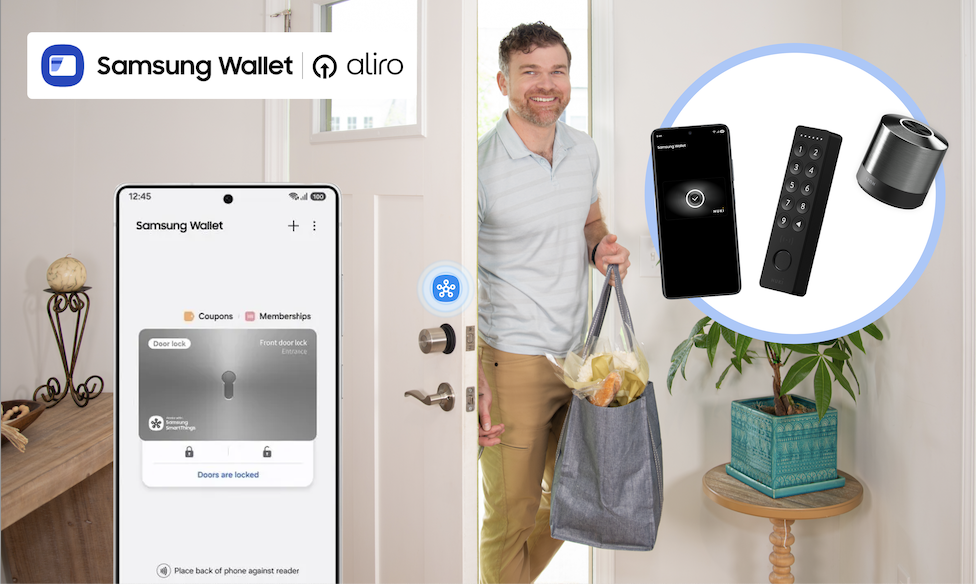
Samsung Wallet, Aliro Locks, and SmartThings turn a simple tap into total home control What if getting into your home didn’t require fumbling for keys, digging through bags, or wondering whether you locked the door on your way out? With the Samsung Wallet, SmartThings, and Aliro-certified smart locks from trusted brands like Aqara, Nuki, ULTRALOQ, and Schlage, your Galaxy phone can become your new door key, unlocking a smarter, safer, and more convenient home experience. Now available on Samsung.com, Aliro-certified locks integrate with SmartThings and Samsung Wallet, giving you tap-to-unlock access, remote control, and powerful home automations that start the moment you walk through the door. Tap to Unlock. Walk Right In. Ever arrive home from a run with nowhere to stash your keys? Instead of slowing down, soon you can simply tap your Galaxy phone on your smart lock. The door unlocks instantly, no physical keys required. Samsung Wallet securely stores your digital keys, while SmartThings keeps everything connected behind the scenes. It’s a simple gesture that makes everyday routines feel effortless. Unlocking your door can trigger far more than just entry. When paired with SmartThings and a compatible hub, Aliro-certified smart locks can become the starting point for your entire home: Lights turn on as you step inside Thermostat adjusts to your preferred temperature Security cameras shift modes Alarms disarm and re-arm automatically Heading out? Lock the door from your phone when you leave, and SmartThings takes care of the rest, shutting off lights or securing devices so you can leave with peace of mind. Designed for Real-Life Moments Technology should make life easier, especially in the moments that matter most. Active lifestyles: Going for a run or walking the dog? Leave your keys behind. Your Galaxy has you covered. Locked-out scares: Step outside to take out the trash and hear the door click shut? No panic required, tap your phone and get back in. Family members: Share secure digital keys with family members through Samsung Wallet, and use SmartThings to manage alarms and routines while they’re inside. Members added to SmartThings can use a designated PIN as well to use the features.  Built for What’s Next: Aliro-Certified Smart Locks Samsung’s tap-to-unlock experience is powered by Aliro Home Key certification, an industry standard created to make digital access to your home more secure, reliable, and interoperable across devices. Aliro-certified smart locks will work seamlessly with Galaxy phones through Samsung Wallet, delivering consistent tap-to-unlock access whether you’re coming home from work, heading out for a run, or letting in a guest remotely. And this ecosystem is growing. Samsung is partnering with a broad range of Aliro-certified lock makers, including Aqara, Nuki, and Allegion brands like Schlage, giving homeowners more flexibility and choice when upgrading their front door. That means confidence today and peace of mind that your home is ready for what comes next. How to Set Up an Aliro-Certified Lock with Galaxy Getting started is easier than you might think. Step 1: Install Your Aliro-Certified Lock Follow the manufacturer’s instructions to physically install your lock. Step 2: Add the Lock in the SmartThings App Open the SmartThings app. Tap Add device and follow the on-screen prompts to connect your lock. Step 3: Add Your Digital Key to Samsung Wallet Once connected, you’ll receive the option to add your home key to Samsung Wallet. Confirm and authenticate, your Galaxy phone is now your key. Step 4: Test Tap-to-Unlock Hold your Galaxy phone near the lock. Tap. Unlock. Done. Want a Routine to try? Try This! Routine Name: “I’m Home!” Trigger: When front door unlocks Actions: Turn on entryway and living room lights Adjust thermostat to comfort setting Disarm security system Turn on Samsung TV Plus automatically  Now your home responds automatically the moment you walk in. You can customize this routine for mornings, evenings, guests, or even specific users. Ready to upgrade? Shop the Aliro-compatible smart locks, Galaxy Devices, and SmartThings hubs now on Samsung.com and fully unlock your home’s potential.
Read More
SmartThings Updates
April 6, 2026

How to Activate the SmartThings Hub Built Into Your Samsung TV

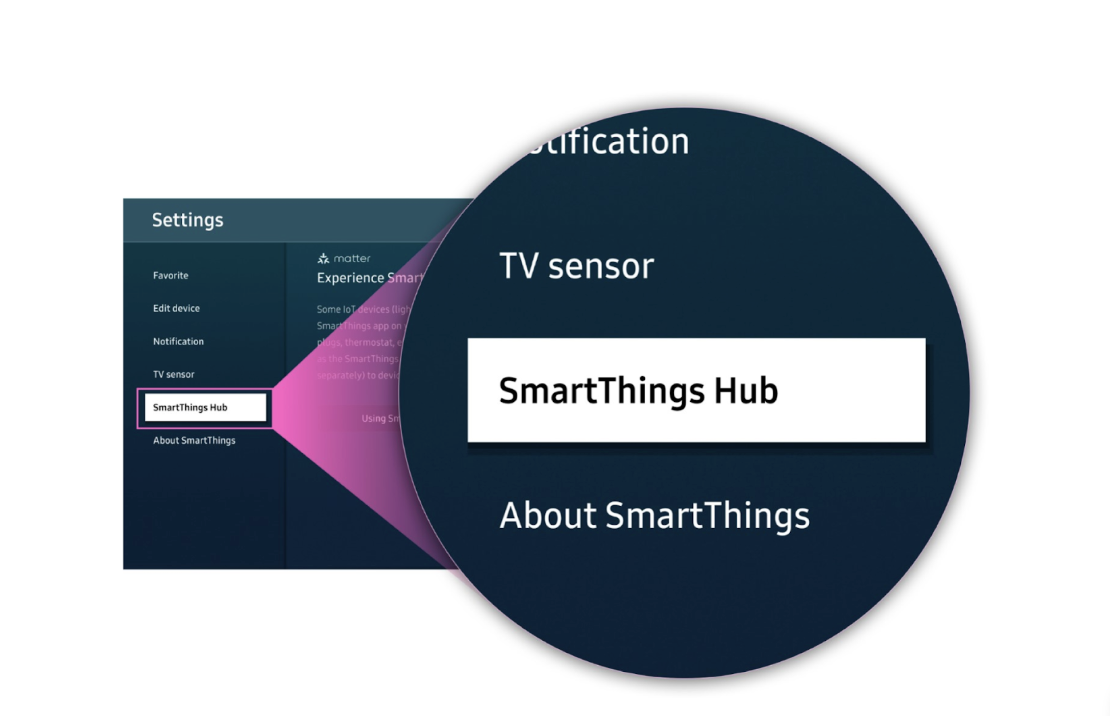
Did you know your Samsung TV can double as a SmartThings Hub? Many 2024 and newer models come with the hub built in, which means no extra device is needed. With just a few steps, you can turn your TV into the heart of your smart home and instantly start connecting devices. Read on for a step-by-step guide to activate your SmartThings Hub.  How it Works There are two easy ways to activate the SmartThings Hub built into your TV: directly from your mobile phone using the SmartThings app, or through the SmartThings app on your TV. Both options follow a similar flow, connect your TV, enable the hub, and start adding devices, so you can choose whichever is most convenient for you. Activate the Hub Using Your Galaxy  If you already use SmartThings on your phone, this is often the fastest way to get started. Step 1: Turn On Your TV Make sure your Samsung TV is powered on and connected to Wi-Fi. Step 2: Open SmartThings on Your Phone Launch the SmartThings app on your mobile device.  Confirm you’re signed in with the same Samsung account used on your TV. Step 3: Find Your TV Tap Devices in the app.  Select your TV from the list. Step 4: Open Hub Settings Tap the Featured icon at the bottom SmartThings Hub shows up on the next screen  Step 5: Activate the Hub Follow the on-screen prompts to turn the hub On. Wait while SmartThings connects to your TV and completes setup. Once finished, your TV is officially activated as a SmartThings Hub. Activate the Hub Using Your TV You can also turn on the hub directly from your TV using the built-in SmartThings app. Step 1: Turn on Your TV Make sure your Samsung TV is powered on and connected to Wi-Fi. Step 2: Open the SmartThings App on Your TV Press the Home button on your remote. Scroll over to Connected Devices Navigate to and open the SmartThings app. Step 3: Access Settings Select the Settings icon (cog wheel) in the SmartThings app. This may also be featured already on the home page. Scroll down and choose SmartThings Hub. Step 4: Activate the Hub Toggle SmartThings Hub to On. The Hub is now active! Step 5: Add Devices Once your Hub is activated: In the SmartThings app, tap + Add device. Scan for Matter or other supported devices. Import them into SmartThings. That’s It! Your Samsung TV is now a fully functioning SmartThings Hub. From here, you can control smart lights, plugs, sensors, and more, all without additional hardware.  With the Hub activated, your TV becomes more than just a screen; it’s now the command center for your connected home. Whether you’re dimming lights for movie night, automating your thermostat when you leave home, or linking new Matter devices as they hit the market, SmartThings makes it seamless.  Need devices to start building out your smart home? Shop them now at https://www.samsung.com/us/smartthings/all-smartthings/ 
Read More
Developers
March 11, 2026

A New Enhanced Experience in the SmartThings Developer Center

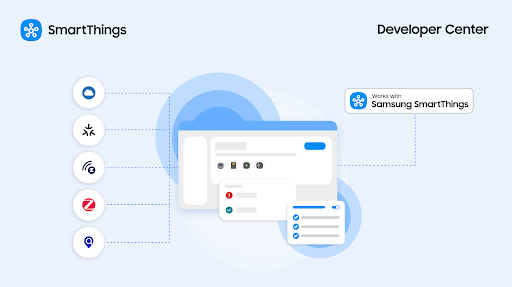
Everything you need to integrate, test, and certify in one guided, streamlined experience.  We’re excited to announce the next evolution of the SmartThings Developer Center - a unified, streamlined experience designed to help partners build, test, and complete integrations faster than ever. As SmartThings expands to support more device categories and service integrations, along with existing integration types and protocols, we’ve redesigned the entire developer journey from the ground up. The result is a single, intuitive console that houses all the tools, workflows, and integrations in one place. Whether you have a device or service, regardless of integration type, the new Developer Center provides a guided path to get from idea → integration → certification → insights. What’s more, over the next few months, we will also be adding new enhancements for Service Integrations.   “You just made it too intuitive. Compared to other ecosystems, this is the easiest one ever.” - Chasen Tolbert, Strategic Partnerships, FireAvert What’s New: A Guided, Intuitive Experience The new Developer Center introduces a redesigned journey from end to-end. Here’s what you can expect: One Console for Every Integration  Device, service, and future integration paths will now live together in one unified console. It is the single, self-serve path to SmartThings.  A Step-by-Step Guided Workflow Every integration includes a clearly defined path with progress indicators and required steps.Partners told us this was one of the most helpful additions. “From an understanding perspective as a brand new user, this is more simplified.  It’s broken down into pieces, and I can see the progress.” – Harsh Khera, Senior Engineering Manager, Kwikset Real-Time Status & Next Steps Every section, including device profiles, setup & support profiles, and test results, is visible in one summary view, updated in real time. Streamlined Product Creation & Certification We reworked the entire product creation flow to make it simpler, guide users through each step, and avoid common blockers. Why It Matters: Faster, Easier, More Scalable Our new Developer Center enhancements are designed to: Reduce your certification time A more guided flow minimizes errors and back-and-forth, giving you a faster path to Works with SmartThings (WWST) approval. Enhance self-serve integrations Our tools make it easier for developers and partners to use the Developer Center. For example, Test Suite has self-testing options for Hub and Cloud Connected devices, which allows partners to self-test for WWST certification without sending devices to a lab for most device types.  Support more integration types Whether your device connects locally via Matter, Zigbee, or Z-Wave using the SmartThings Hub, authenticates using a SmartThings Schema app, or connects directly with the SmartThings Cloud using the SmartThings Device SDK, you’ll find all the tools and guidance you need in one place. Coming soon, SmartThings Find devices will join this same simplified integration journey.  For partners building a service integration, stay tuned for full support of SmartThings API Access Apps, allowing third-party web or mobile applications to securely access devices, scenes, and locations through the SmartThings API. Improve collaboration across teams A single, unified console lets product, engineering, QA, and business stakeholders collaborate on integrations with full visibility. “There are various people doing different things. It’s important for others to pick up in the same place.” - Charlie Dougherty, Sr Product Manager, Kwikset Adding to Your Integration with Partner Analytics The updated Developer Center includes SmartThings Partner Analytics, offering insight into how customers use your products, while maintaining user privacy: Devices most often used with yours in routines  Top sources of your product sales  Most-used features and SmartThings capabilities Get actionable insights with SmartThings Analytics.   Explore Analytics in the Developer Center or read our blog to learn more.   Expand Your Brand with Shareable Routines We recently rolled out Shareable Routines, which allows WWST-certified partners to create SmartThings routines that showcase your products alongside other partner devices. SmartThings users can easily import these routines into the SmartThings app.  For example, users can receive a ready-made routine that opens the smart blinds or turns on the lights each morning.  Shareable Routines help increase product discovery and drive ongoing engagement within the SmartThings platform. If a user does not have a compatible product, SmartThings shows your recommended devices  with “Buy” links, helping new customers find and purchase your products directly in the SmartThings app. Stay tuned for our additional announcements on Shareable Routines.   Together, our Developer Center, Partner Analytics, and Shareable Routines give you an easier way to integrate with SmartThings, product usage insights to optimize your products and roadmap, and a new way to share your products with users.  Start Building With the New Developer Center Try the new experience: Visit the Developer Center Explore the new guided journeys Thank you for your partnership!
Read More
SmartThings Updates
November 5, 2025

Rest Better with SmartThings, Eve, and the Smart Home Hub 2 

From real-time temperature insights to automated blinds, the SmartThings Sleep Environment report helps you begin your journey to better sleep.   Sleep is one of the most important parts of your health and well-being. Yet so many of us struggle with it, tossing and turning, waking up groggy, or dealing with little ones who just won’t stay down for the night. The truth is, your environment plays a huge role in how well you rest. The SmartThings Sleep Environment Report gives you a clearer picture of what’s happening in your bedroom while you rest, so you can make small changes that add up to better nights and brighter mornings. With the Aeotec Smart Home Hub 2 and the Eve Weather Connected Weather Station, you’ll have everything you need to get started.   How to get started with better sleep The Aeotec Smart Home Hub 2 is the brain of your smart home, connecting your devices and automations in one place. Pair it with Eve Weather and you unlock powerful new insights into your sleep environment, making this duo the perfect starting point for a smarter, healthier home. Both devices are Matter-certified for simple setup, work with both Android and iOS, and are designed to make your home more responsive from day one. Smarter Insights with the Sleep Environment Report The SmartThings Sleep Environment Report collects and analyzes data from connected devices in your home to help you understand what’s impacting your rest. It highlights patterns and potential disturbances like changes in temperature, humidity, or air quality, and shows when devices were active during the night.  When paired with Eve Weather, SmartThings gains precise temperature and humidity readings from your bedroom. When combined with additional WWST sensors, insights such as CO2 levels and lighting can also be included. The report then uses that data to visualize your overnight environment, revealing whether your room got too warm, too cool, or too dry at any point.  Was the room too warm between 1 a.m. and 3 a.m.? SmartThings highlights the factors that could be disturbing your rest and even shows which devices were running during the night.  In addition, with the Samsung Health integration, you can combine this environmental data with your actual sleep measurements from Galaxy wearables to give you the full picture of both how you slept and why. Automations that Work While You Sleep Once SmartThings identifies the factors affecting your sleep, it helps you fix them automatically. By pairing the Smart Home Hub 2 with Eve Weather, you can set up routines that respond to changes in real time:   Lowering the thermostat when the room gets too warm in the middle of the night Turning on a humidifier if the air gets too dry Dimming or shutting off lights at bedtime to help you wind down Raise blinds upon waking up  Instead of waking up to discomfort, your smart home quietly adjusts to keep your environment optimized for rest.  Sleep Better, Live Better It’s not just about comfort, it’s about waking up refreshed and ready for your day. With a smarter nighttime routine powered by SmartThings, the Smart Home Hub 2, and Eve Weather, you’ll finally have the environment your body needs for deeper rest. And this solution works for the whole family. Parents can create routines that keep nurseries cozy through the night. Busy professionals can finally stop blaming stress when it’s really the air or temperature at fault. Even tech enthusiasts will love how seamlessly the system responds to real conditions in real time. To take your sleep setup a step further, pair your system with Eve Blinds, motorized, Matter-enabled blinds that automatically close at bedtime to block out streetlights or early morning sun, then open gently when it’s time to wake.  Combined with your Eve Weather data and Sleep Environment Report insights, you can create a “Good Night” routine that lowers blinds, turns off lights, adjusts the thermostat, and begins tracking your sleep conditions, automatically through SmartThings.  If you’re ready to say goodbye to restless nights and hello to mornings that feel truly refreshing, start with the Smart Home Hub 2 and Eve Weather, and consider adding Eve Blinds for the ultimate smart sleep setup. Together, they’ll help you understand your environment, improve your comfort, and create routines that support the rest you deserve. Shop Eve Weather and Aeotec Smart Home Hub 2 now on Samsung.com.
Read More
SmartThings Updates
October 27, 2025

Samsung Electronics Strengthens AI Home Experience with the Aeotec Smart Home Hub 2

Smaller, faster, and more versatile, the new Samsung SmartThings hub strengthens connectivity for the world’s most advanced smart home ecosystem. Samsung Electronics has recently announced the release of the Aeotec Smart Home Hub 2, the most advanced and compact smart home hub to date. Coming soon to Samsung.com, the hub is designed to be the foundation of responsive and reliable smart homes, with the latest connectivity, the Smart Home Hub 2 works as a Samsung SmartThings Hub and supports popular smart home standards, allowing users to create the personalized AI Home experiences they want, with the devices they want. For more than a decade, SmartThings has connected millions of users worldwide to a more convenient, secure, and efficient lifestyle. Through the Works with SmartThings (WWST) program, SmartThings collaborates with approximately 380 partners to support more than 4,500 certified devices, ensuring broad compatibility across brands. In addition, SmartThings is a leader in supporting Matter, the global smart home standard that further expands the ecosystem, making it even easier for users to connect and control devices from multiple brands within a single, seamless experience. “With Smart Home Hub 2, we’re enabling more people to start and grow their AI Home experience with the speed and reliability of a dedicated hub, industry-leading Matter support, and of course the power and breadth of the SmartThings ecosystem,” said Jaeyeon Jung, Executive Vice President and Head of SmartThings at Samsung Electronics. “We will continue working closely with partners to strengthen the SmartThings ecosystem and maintain our leadership in setting global smart home standards.” Smarter, Smaller, and Faster Developed in collaboration with partners through Samsung’s WWST certification program, and distributed by Samjin in Korea and Aeotec globally, the Smart Home Hub 2 supports Zigbee, Thread, and Matter protocols, enabling robust interoperability across a wide range of smart home devices. Key performance upgrades include: Expanded device capacity allows the hub to control more connected devices  70% faster CPU performance compared to the previous model Double the RAM for smoother multi-device connections 50% smaller footprint for easier placement Wall-mount option to maximize installation flexibility Local-first communication so automations continue to run even if internet connectivity is lost These upgrades ensure connecting and controlling devices is fast, responsive, reliable, and ready to grow with your smart home and everyone in it. The Smart Home Hub 2 will be available for purchase through Aeotec’s distribution channels and Samsung.com. Leading the Matter Standard with Unmatched Compatibility SmartThings has not only been a leader in developing Matter, but was the first ecosystem to support Matter, has been among the fastest to implement new Matter versions, and has publicly committed to timely device support and feature updates. The Smart Home Hub 2 delivers the best experience for users looking to start and grow their smart home with Matter, with support for hundreds of Matter-certified devices from a wide range of brands, including Matter-over-Thread products via its integrated Thread Border Router. “Samsung SmartThings has been a leader in Matter since day one. Not just in its contribution to the standard itself, but in its consistent commitment to delivering Matter benefits and updates to SmartThings users and device makers,” said Tobin Richardson, President and CEO of the Connectivity Standards Alliance. “It’s exciting to see the release of the newest SmartThings-compatible hub continuing that commitment and giving users a new way to build their smart homes with Matter.” Effortless Setup and Powerful Automation Smart Home Hub 2’s streamlined onboarding process enables quick setup, even for first-time smart home users. Once connected, the hub enables advanced automation, such as: Automated home security with real-time alerts, streaming, and smart locks Adaptive climate control based on presence detection Energy monitoring to identify and optimize high-consumption devices Safety enhancements like leak detection, smoke alarms, and air quality monitoring Sign up today to be the first to know when the Smart Home Hub 2 is available for purchase on Samsung.com here. 
Read More
Partner Spotlight
October 20, 2025

Ditch the Keys, Unlock the Future

Samsung SmartThings and Nuki bring you a future where your phone and routines unlock the door. Samsung SmartThings is all about making life at home easier, safer, and more connected. That’s why we’re excited to welcome Nuki, Europe’s #1 keyless home access solution, into the SmartThings ecosystem. With its sleek design, strong security, and effortless installation, the Nuki Smart Lock has already transformed how hundreds of thousands of households across Europe open and share access to their homes. Now, with its U.S. debut, SmartThings users can enjoy the same trusted experience, seamlessly integrated into the routines and automations they rely on every day. From Keys to Keyless We’ve all been there: fumbling for keys in the rain, wondering if we remembered to lock the door, or dealing with the frustration of misplaced house keys. Nuki was created to solve exactly those problems. Founded in Austria and already trusted by over one million users across Europe, Nuki brings its proven reliability to American homes for the first time. Together with SmartThings, it’s helping redefine what home access can look like—smart, simple, and secure. Simple to Install, Effortless to Use The Nuki Smart Lock installs on the inside of your door in just fifteen minutes with no drilling, no complicated tools, and no professional help required. Once it’s in place, your smartphone becomes your key. Whether you prefer tapping your phone, scheduling access for family members, or using Nuki’s Auto Unlock feature, entering your home feels instant and effortless. Paired with SmartThings routines, Nuki fits naturally into your day-to-day life.  Smarter Living with SmartThings + Nuki Picture this: You’re walking up to your front door, hands full of groceries. Instead of fumbling for keys, your door unlocks automatically as you approach. The entryway lights flick on, your thermostat shifts to the perfect temperature, and your favorite playlist starts, all without you touching a thing.  Heading out for the day is just as simple. A single “Goodbye” routine locks the door behind you, powers down the lights, and arms SmartThings Home Monitor.  You leave with a peace of mind, knowing your home is safe, secure, and running efficiently in the background.  With support for Matter over Thread, Nuki fits perfectly into the SmartThings ecosystem.  That means easy setup, reliable performance, and the confidence that your smart lock works alongside the devices and automations you already rely on every day. Built for Security and Speed Behind the effortless experience is a foundation of security, which sits at the heart of Nuki’s design. Every Smart Lock uses end-to-end encryption on par with online banking, keeping your data safe and local. Unlike many alternatives, Nuki doesn’t require you to create an account, so your privacy is never compromised. And it’s quick, unlocking in under a second, faster than fishing for keys or even tapping your phone. Designed to Fit Any Home At only 2.2 inches in diameter, with a stainless steel body and minimalist design, the Nuki Smart Lock blends seamlessly into any door. Its thoughtful design has earned global recognition, including the CES Innovation Award and the iF Design Award, showing that smart access can be both functional and stylish. SmartThings delivers a powerful platform that unites devices and services across the connected home, while Nuki contributes Europe’s leading retrofit access solution, designed with privacy, security, and award-winning design at its core. By joining forces, we’re bringing users a smarter, safer, and more seamless home experience, one that starts right at the front door. Unlocking the Future By combining Nuki’s trusted smart lock technology with the power of SmartThings automations, homeowners and renters alike can enjoy a new level of convenience and security. Together, we’re redefining what access looks like: not just keyless, but truly smarter. Ready to make your keys a thing of the past? Connect your Nuki Smart Lock with SmartThings today and discover a smarter way home.
Read More
SmartThings Updates
October 1, 2025

Samsung SmartThings Introduces Two-Way Thread Network Unification

New industry-first capability simplifies smart home setup, boosts network performance, and enables greater interoperability across ecosystems October 1, 2025 — Mountain View, CA — SmartThings, Samsung Electronics’s global connected living platform, today announced it is one of the first major smart home ecosystems to support two-way Thread network unification, enabling users to seamlessly join SmartThings Hubs to existing Thread networks formed by other ecosystems and vice versa. This update helps users build and grow their smart home with Thread devices, taking advantage of Thread’s mesh networking for better range, responsiveness, and reliability. With Thread network unification, a new SmartThings Hub can either join an existing Thread network right after the initial setup or allow a Border Router (BR) from another ecosystem to join the Thread network already in use by SmartThings. Once unified, all Border Routers in the home work together seamlessly. “SmartThings has always been about giving users choice and flexibility in how they build their smart home,” said Mark Benson, Head of SmartThings US. “Thread network unification eliminates the barriers between ecosystems, so devices and Border Routers can work together in one powerful mesh, delivering the performance and simplicity our users have been asking for.” Key Benefits Better Range & Reliability — Unified BRs form a single, self-healing mesh that covers more of the home, maintains connections even if a device goes offline, and routes data along the fastest available path. Simplified Setup — Joining the right Thread network from the start prevents network fragmentation and avoids the complexity of migrating devices later. Flexible Network Management — Users can add or remove BRs from the unified network at any time, see all connected BRs across ecosystems, and maintain connected devices even when a BR leaves a network. How It Works A new “Manage Thread Network” menu in the SmartThings Hub interface guides users through the unification process: Joining a SmartThings hub to an Existing Thread Network:Select “Join another network” in the SmartThings app.Join a chosen network via saved Thread credentials in the mobile OS credential locker, or by scanning a QR code/entering a one-time passcode (OTP) from a third-party app with a compatible Thread 1.4 Border Router in the sharing mode. The SmartThings hub securely retrieves credentials and joins the target network in minutes. Adding a Third-Party Border Router to a SmartThings Hub’s Thread Network:Select “Share SmartThings network” in the SmartThings app.Initiate the Thread 1.4 credential sharing, which generates a QR code and a one-time passcode (OTP). Scan the QR code or enter the OTP in the third-party app to join its Border Router to the SmartThings Thread network. While Thread Network Unification delivers a significant leap in simplicity and performance, realizing the full benefits of Thread 1.4 credential sharing depends on having compatible Thread 1.4 BRs across ecosystems. At launch in Q3 2025, the feature will be available on select SmartThings hubs (including the Aeotec Smart Home Hub and the Aeotec Smart Home Hub 2), with more hubs to follow. Users will need the latest 0.58.x hub firmware and iOS 1.7.37.x and Android OS 1.8.37.x mobile app from SmartThings. Third-party ecosystems may release Thread 1.4 compatibility updates to their Border Routers on their own timelines. For more information about Thread Network Unification and the latest SmartThings updates, visit https://www.samsung.com/smartthings. ### About SmartThings SmartThings, Samsung’s global connected living platform, builds smart homes that are convenient, safe, sustainable, and fun. Millions of people, in nearly 200 countries, use SmartThings to easily control their connected homes and IoT devices. SmartThings delivers simple, powerful experiences across Samsung’s leading portfolio of phones, TV, and appliances. We offer the most versatile smart home experience as an open platform with a rich partner ecosystem. As a founding member of Matter, we are a leader in the industry to help make smart homes more secure, reliable, and seamless to use. Do the SmartThings at www.partners.smartthings.com
Read More
SmartThings Updates
September 25, 2025

SmartThings Launches New Safety Services with SmartThings Safe Button (Free)

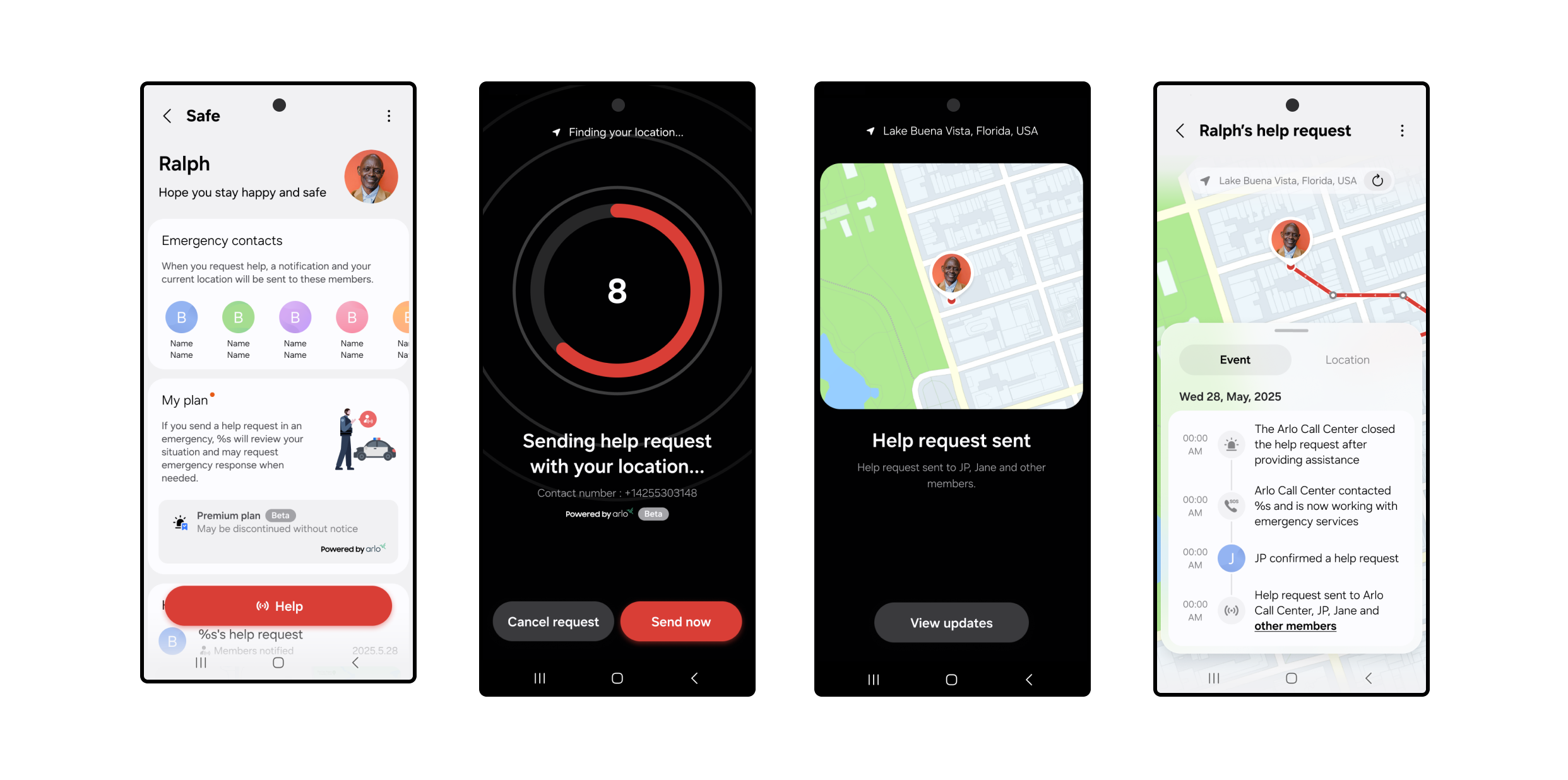
With push notifications that keep your inner circle updated, the new offering provides daily peace of mind Staying connected with loved ones has never been more important. Whether it’s parents wanting to know their kids got home safely, caregivers checking in on aging relatives, or friends looking out for each other during a night out—location sharing has become a core part of how families support one another. In fact, 41% of U.S. adults already share their location with someone they trust, showing just how common these check-ins have become. That’s why SmartThings is launching the SmartThings Safe Button (Free). With just one tap in the SmartThings app, you can instantly send a push notification requesting help and your GPS location to family and friends you’ve added as Location Members—providing daily peace of mind at no cost. Whether you’re walking home late, traveling, or simply want to let someone know you’ve arrived safely, SmartThings Safe Button (Free) makes staying connected effortless. How It Works With SmartThings Safe Button (Free), checking in is as simple as tapping a button in the SmartThings app. When you press the Safe Button: A push notification is sent to all family and friends you’ve added as Location Members. The push notification instantly alerts your trusted contacts, sharing your GPS location and providing quick options to call, text, or navigate directly to you. Your family and friends can quickly see where you are and the SmartThings app will prompt them to respond right away via SMS or Phone Call. This service is designed for staying connected with your loved ones. SmartThings Safe Button (Free) does not call or notify emergency services; instead, it provides a fast, reliable way to let the people who matter most know where you are. Please note users must have Location Services enabled on their mobile device in order to send their real-time location. Setting Up SmartThings Safe Button (Free) Getting started is simple: Open the SmartThings app on your mobile device. Navigate to the More tab in the bottom right corner. Select the Safe icon and follow the prompts to set up SmartThings Safe Button (Free). To make sure the alerts reach the right people, you’ll want to add family members or friends as Location Members: From the Home tab, tap the ‘+’ sign next to the options menu (three dots) in the upper right corner. After tapping the ‘+’ sign, select the last option in the dropdown menu: ‘Invite Members.’ Enter their email addresses associated with their SmartThings account (user must create a SmartThings account in order to be added as a Member) of the people you’d like to add. Once they accept, they’ll begin receiving your Safe Button notifications. Please note, Location Members must have the SmartThings app on their device as well as a SmartThings account to receive the Location Member notifications. Location Members will only receive the Safe Button alerts if they have their SmartThings notifications enabled. SmartThings Safe Button (Free) is now available on both iOS and Android mobile phones. Users with Galaxy watches and Apple Watches can receive Safe notifications on their watch. Note: You cannot request help from Smart Watches at this time. For additional questions, you can check out the FAQ for SmartThings Safe Button (Free) here. Stay tuned for future updates as we continue to expand safety features across the SmartThings ecosystem.
Read More
Partner Spotlight
September 23, 2025

Start Your Smart Home Journey with Eve

From morning coffee to movie night, discover how simple smart living can be with Eve devices now available on Samsung.com Building a smart home doesn’t have to be complicated. In fact, with the right tools, it can fit naturally into your daily routines, saving time, energy, and even money along the way. SmartThings continues to make it easier than ever to create a connected home. For the first time, devices from some of our partners are available to purchase directly on Samsung.com— alongside your favorite Samsung products that connect with SmartThings to automate your home, monitor energy use, and help you enjoy a more convenient life every day.   We’re excited to welcome Eve as one of the first Works with SmartThings brands featured on Samsung.com. Known for its beautifully designed, energy-efficient, and easy-to-use smart home products, read on to learn why Eve is the perfect brand to kick off your smart home experience.  Smarter Mornings Picture this: you wake up, grab your phone, and your day starts with a tap in the SmartThings app. Your bedside lamp, plugged into the Eve Energy Smart Plug, turns on automatically. The coffee maker kicks in without you pressing a button. And while you’re getting ready, your Samsung TV shows you how much energy your devices used overnight. With SmartThings routines, the Eve Energy Smart Plug becomes part of your morning flow, helping you save time and start the day on your terms. Device features include: Instantly turns any device into a smart device—just plug it in. Works with SmartThings Energy to help you monitor usage trends, set automations, and get energy-saving tips. Turn devices on and off with a simple tap, automatically based on your routines or by using your voice. Control remotely through the SmartThings app (available for both Android and iOS). Track real-time energy consumption and take charge of your savings. All you need is a SmartThings Hub; get started with the latest Samsung TVs, which come equipped with a built-in hub with Matter over Thread functionality.  Take Control of Energy Use Ever wonder which devices are quietly driving up your energy bill? By connecting a device to an Eve Energy Smart Plug, you can see exactly how much power each device is using in real-time, as well as predict what the annual cost will be. This, combined with SmartThings Energy (an energy-monitoring service within the SmartThings app), will help spot energy hogs (like the fan that runs all night) and set up automations to reduce waste. You’ll get clear insights, personalized tips, and the satisfaction of knowing your smart home is also a sustainable one.  Smarter Evenings with Your TV When it’s time to unwind, your Samsung TV does more than stream movies. With a built-in SmartThings Hub, it can connect directly to the Eve Energy Smart Plug. Use SmartThings Quick Panel to turn on the lamps, turn off devices in another room, or check if you accidentally left something running—all from the couch. Access the Quick Panel by pressing the 123 keys on your Samsung TV remote and selecting the SmartThings icon.  Samsung TVs with built-in SmartThings Hub and Thread Border Router include the following models: 2025 QN990F, QN950F, QN90F, S95F, QN90F, S90F, QN85F, S85F, QN80F, QN70F, Q8F,LS03F(The Frame) 2024 QN900D, QN850D, QN800D, QN95D, S95D, QN90D, S90D, QN85D, S85D, QN80D, Q80D, Q70D, Q60D, 32Q60D, DU900*, 85DU8000, LS01D (The Serif), LS03D(The Frame) 2023 QN900C, QN800C, QN95C, S95C, S90C, QN90C, QN85C, Q80C, Q70C, Q60C, 32Q60C Why Start with Eve? Eve products are designed to be easy for anyone to use, whether you’re tech-savvy or just curious about the smart home. With a simple setup, clean design, and compatibility with both Android and iOS, they’re the perfect entry point into SmartThings. Use the SmartThings app to control multiple Matter-enabled devices with a single command and save yourself the hassle of running to and fro: A “Movie Night” scene can shut your blinds, turn on your mood lights, and switch on your Samsung TV. Or, when coming home, a motion sensor can automatically turn on your lights connected to Eve Energy. Eve is just the beginning. Stay tuned as more Works with SmartThings partners join Samsung.com, expanding your options for building a home that adapts to you. Shop Eve’s products and other Works with SmartThings devices now on Samsung.com. 
Read More

Posts navigation

12345…7

Posts navigation

1234…7
Stay Up to Date with SmartThings
Work with us icon
About SmartThings
Learn More
Partnership Opportunities
Learn More
SmartThings Developer Center
Learn More
SmartThings Inc. is based in Mountain View, California and operates independently as a wholly owned subsidiary of Samsung Electronics America, Inc.
   
Works with SmartThings
Supported Devices
Matter
Products & Services​
SmartThings App​
SmartThings Station​
Hub Everywhere​
Map View​
SmartThings Energy​
SmartThings Music Sync​
SmartThings Build​
Products & Services​
SmartThings App​
SmartThings Station​
Hub Everywhere​
Map View​
SmartThings Energy​
SmartThings Music Sync​
SmartThings Build​
Co-Marketing Opportunities
Explore
Digital Campaigns​
PR Opportunities​
Events
Resources​
Blog
Newsroom​
Brand Guidelines​
Samsung.com​
Developer Center​
Download App​
On Google Play​
On App Store ​

© 2024 Samsung Electronics Co., LTD.

Report Vulnerability
Privacy
Cookie
Terms